
How Apple’s latest education film and MacBook Neo quietly turn curiosity into infrastructure¹²³
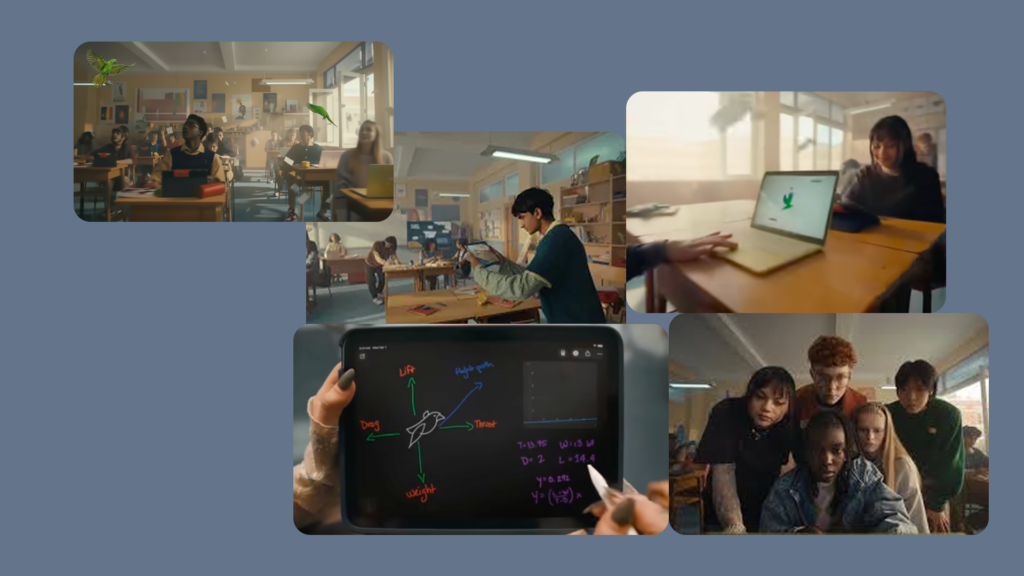
‘Today we’re learning about flight.’ A flock of Amazona parrots bursts into a classroom, the room erupts, and within seconds the chaos has been domesticated into a neat inquiry on motion and lift.¹ The children reach for iPads as instinctively as they laugh; a slim Mac notebook—almost certainly standing in for Apple’s new, education‑priced MacBook Neo—sits ready to model whatever the teacher needs the birds to become.¹³
Already, Apple is selling more than hardware. It is selling a script for what “good” classroom behaviour looks like when its ecosystem is in the room.
Surface product, deeper script
On the surface, Apple Education: Ready for every learning opportunity is a simple proposition: Macs and iPads belong at the heart of contemporary classrooms.¹ The YouTube description is disarmingly modest: ‘Apple devices are designed to support all the delightful teachable moments that can happen in any classroom with every kind of learner. Mac. iPad.’¹ There is no mention of chips, no explicit call‑out to MacBook Neo, no list of features.
Yet visually, the Mac on the teacher’s desk is doing double duty. It reads as a modern 13‑inch notebook much like MacBook Neo, launched weeks earlier as Apple’s ‘most affordable Mac ever’. Education pricing pushes it to about ₹59,900 in India and roughly $499 in the US.²³⁷⁸
In other words, the film is clearly showcasing both MacBook Neo and iPads as the natural pair for the modern classroom. It never says ‘Neo’ out loud, but the silhouette is obvious.¹²⁷⁵
The behavioural loop hiding in plain sight
Structurally, the film is tight:
- First, disruption: a noisy flock of parrots barges into the lesson and seizes all attention.¹
- Then, reframing: ‘OK, class, can somebody tell me what kind of birds these are?’ and, moments later, ‘Today we’re learning about flight.’¹
- Finally, system response: iPads record the birds, the Mac simulates lift and drag, AirDrop chimes mark the hand‑off of work back into the room.¹³
So the film is not just suggesting that Apple devices are present in classrooms. Rather, it is rehearsing a behavioural loop: see something unexpected, recast it as learning, and route it through Apple.¹³ Neo’s job in the background is to make that loop sound more financially plausible.
Apple is no longer only selling devices to schools. It is selling continuity as a lifestyle — and with Neo, it is arguing that continuity is finally affordable.
Why this campaign, right now?
Crucially, this film and MacBook Neo arrive into a very noisy landscape.
On one flank, AI players are in full spectacle mode. OpenAI, Google and others are pushing voice agents and ‘classroom copilots’ that promise to summarise chapters, mark homework and personalise learning on demand.³ Their launch videos are full of animated interfaces and synthetic voices, designed to show that intelligence has become a product layer.
On another flank, Chromebooks and low‑cost Windows laptops still dominate many school systems, particularly where central procurement and budgets matter more than anodised aluminium.⁴ In such contexts, Apple has often looked like the premium, aspirational option rather than the baseline.
At the same time, Apple’s own education materials work hard to tell a different story. The Apple and Education – Inspiring every kind of mind page in India talks about empowering ‘every kind of educator — and every kind of student — to learn, create and define their own success’, with privacy and accessibility ‘built right in’.² Meanwhile, K–12 Education emphasises ‘powerful tools’ that are flexible, intuitive and secure.³ The Education Initiative and Impact Report add language about equity, justice and under‑resourced communities.⁵
How MacBook Neo slots into the story
Within that context, two things happen in quick succession:
- Apple launches MacBook Neo, a 13‑inch Mac with Liquid Retina display, Apple silicon and ‘all‑day’ battery life, explicitly pitched as its entry‑level laptop for students and first‑time Mac users, with aggressive education pricing.²³⁷⁸
- Apple publishes this education film, which shows a Mac notebook as an effortless, almost invisible part of a classroom where curiosity always finds a device waiting to process it.¹
By contrast with AI spectacle, the film avoids saying ‘AI’ at all. It shows no talking assistant and no glamour shot of on‑device models. Neo is marketed elsewhere as ready for Apple Intelligence, but that detail stays off‑screen..
So Apple’s bet is clear. Trust and continuity, supported by lower entry hardware pricing, will matter more in education than the flashiest AI demo.³²⁷⁵
For practitioners, that is the timely shift: when everyone else is yelling about intelligence, Apple is quietly trying to own infrastructure.
The choreography of effortless learning
Stylistically, the film is a machine for erasing friction.
The soundtrack—Old Man Saxon’s ‘Dreams’—provides a steady, optimistic beat.¹ As the track talks about seeing ‘everything in my dreams’, the camera shows us children seeing everything through glass. Transition after transition keeps that mood intact:
- When the flock bursts in, we cut from chaos to a composed teacher in seconds; there is no visible moment of ‘What on earth do I do now?’.¹
- When a child identifies the birds as Amazona parrots that ‘live in flocks’ and are ‘very loud’, we do not see the search, just the confidence of the answer.¹
- When the teacher asks, ‘What happens if we change lift?’, the Mac simulation responds immediately, and a child answers, ‘Oh, that helps,’ as though the interface has simply clarified reality.¹
Moreover, there are no sign‑in screens, no spinning wheels, no permission pop‑ups. If latency exists, it exists off‑camera. The message is that computation is only interesting once it has already succeeded. Everything else is noise.
On the iPads, we glimpse clean camera and sharing flows: frame bird, capture, share.¹ On the Mac, we see a single window with a simple simulation rather than a cluttered desktop.¹ Altogether, the film suggests that the ‘right’ education technology feels instant, legible and almost invisible.
For UX practitioners, however, that disappearance is double‑edged. It sets a cinematic benchmark: if your classroom app takes three taps where Apple’s edit implies one, your product won’t just feel clumsy. In this narrative, it will feel like it is stealing time from learning.
Learning as a captured loop
Apple’s education copy talks about every learner having ‘their own way of learning and expressing creativity’, and about technology that helps them ‘learn, create and define their own success’.² Its accessibility pages go further, arguing that technology is most powerful when it supports everyone, including those with vision, hearing, mobility or cognitive differences.⁶⁸
In this film, however, the worldview comes through a narrower lens. Consider what is being normalised:
- Devices feel quasi‑personal. Each group has an iPad; the teacher has a Mac notebook to hand. There is no visible scarcity.¹³
- Learning is looped through screens. The flock is observed with eyes, but it is ‘understood’ through recorded video and on‑screen models.¹³
- Evidence becomes digital by default. The instinctive move when something interesting happens is to film it and simulate it, not simply discuss it.¹³
From curiosity to workflow
You can almost write the behavioural loop as a formula:
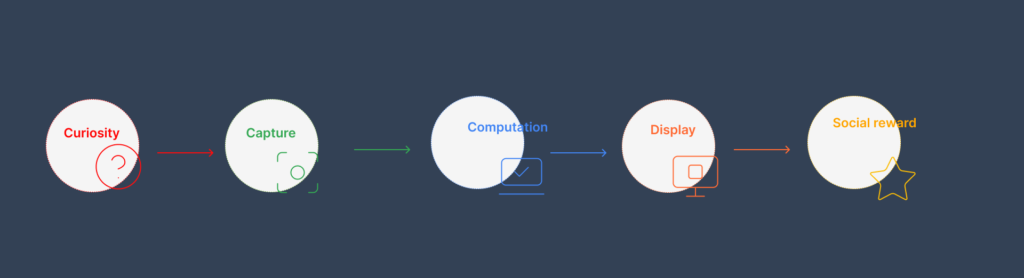
Curiosity (flock appears) → Capture (iPad camera) → Computation (Neo‑class Mac) → Display (shared screen) → Social reward (‘Great job today, class’).¹²³
That loop is Apple’s real product. MacBook Neo simply lowers one barrier to entering it by bringing down the price of the ‘Computation’ stage.²³⁷⁸ Thus, a classroom plugged into this loop is framed as ‘ready for every learning opportunity’. A classroom that is not, by implication, is slightly behind.
From a design perspective, this risks becoming the default lens: you focus on moments that yield neat artefacts—videos, diagrams, simulations—and you quietly devalue forms of learning that resist capture.
Inclusion by casting, exclusion by design
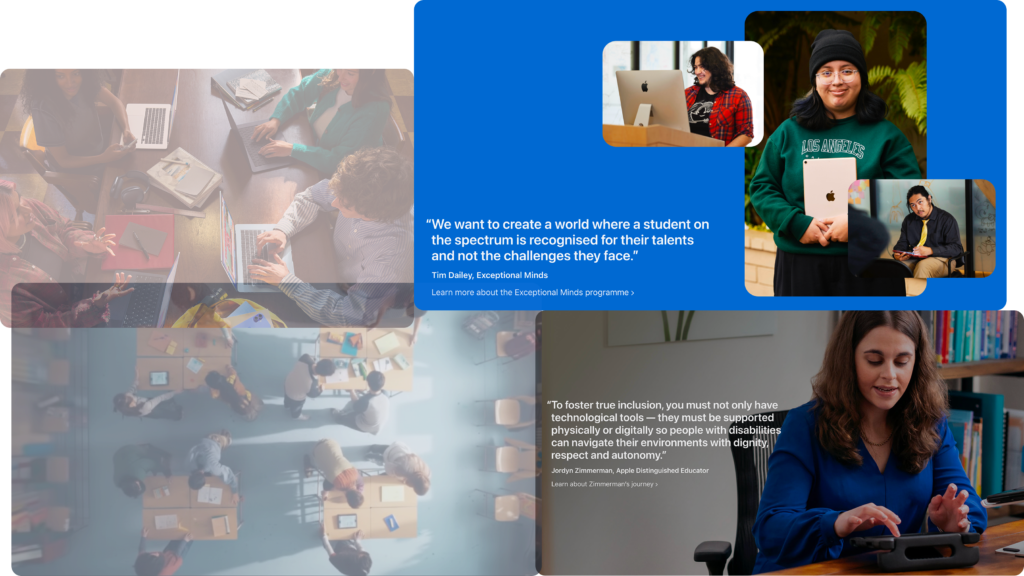
Apple’s broader accessibility story is, on paper, serious. It publishes detailed guides for education on accessibility features across five categories—vision, physical and motor, hearing, speech and general.⁶⁸ It highlights tools such as VoiceOver, braille support, Zoom, Live Captions, Sound Recognition, Switch Control, Assistive Touch, Guided Access and more, with dedicated training resources like ‘Supporting all learners with accessibility features on iPad’ and ‘iPad: Accessibility’.⁶⁷⁷⁹⁸⁰ Case studies in the Apple Education Community describe schools using these tools to support autistic students, dyslexic readers and learners with complex motor needs.⁶²⁷⁶
Nevertheless, none of that appears in this film. Every learning cue is either visual (see the birds, see the simulation, see the class output) or auditory (hear the squawk, hear the teacher, hear the music).¹ There are:
- No captions when students speak.
- No sign of magnification or zoom.
- No slowed‑down playback or alternative modality for understanding the content.
Instead, the film leans on racial diversity in casting as a visual shorthand for inclusion. It quietly excludes the learner who cannot see the birds, cannot hear the teacher, or cannot process a fast‑moving simulation in real time. That is a gap between Apple’s accessibility rhetoric and its most prominent education imagery.
In other words, the “learning spectrum” is acknowledged in documentation and training videos, but the version of “every kind of learner” this film puts on screen is tightly constrained. For educators and designers who care about disability, that is not a minor omission; it is the most telling silence in the ad.
The second accessibility gap: infrastructure
There is another form of accessibility the film edits out: the network.
Apple provides guides and PD sessions about using Classroom and Schoolwork in hybrid or bandwidth‑constrained environments.⁷⁶ It talks about iPad being powerful even offline and about on‑device features that don’t depend on cloud connectivity.⁶⁰⁷³ In practice, however, Apple’s own educator forums and sysadmin communities tell a more precarious story.
Posts with titles like ‘Apple classroom shows all students Offline’ and ‘Classroom App – showing Offline students’ describe classrooms where every iPad appears offline until each student toggles Wi‑Fi, or where devices that went to sleep never reconnect without a hard reset.⁶⁵⁶⁹⁷⁷ Support videos demonstrate workarounds for Classroom being unable to authorise students reliably.⁸¹ You can read these threads as field notes from fragile infrastructure.
Against that backdrop, the film’s classroom lives in a world where AirDrop never fails and bandwidth is infinite. There is never a question of which three students get the one stable connection.¹ There is no moment where a teacher abandons live sharing and reverts to the whiteboard because the network choked.
So while Neo’s aggressive entry‑level pricing in India and elsewhere addresses one dimension of accessibility—purchase price—the infrastructural dimension remains largely unacknowledged in the narrative.⁷⁵⁷⁸ If your school’s Wi‑Fi cannot reliably support a room full of streaming iPads and Macs, the loop the film promotes is aspirational, not operational.
Aspirational classroom, real‑world gap
Apple’s Education Initiative and impact reports highlight under‑resourced communities, coding labs in public schools, and partnerships intended to tackle racial and economic inequity.⁵ Its accessibility campaign materials show blind, deaf and disabled students using Apple tools in grounded, specific ways.⁶³⁶⁷ Nevertheless, the classroom in this particular film looks like a high‑resource environment:
- It has ample space, stable lighting and modern furniture.¹
- Devices appear plentiful, with no visible sharing or rotation.¹³
- The network, implicitly, is robust enough for seamless capture and sharing.¹
When you overlay Neo on top of that imagery, Apple appears to be making a strong claim. This vision of school is not just for elite private institutions; it is something more attainable now that there is a ‘cheaper’ Mac.²³⁷⁸
Yet in many Indian government schools and in plenty of public systems globally, even Neo’s education pricing is still a substantial capital expense once you factor in 1:1 access, support and infrastructure.⁷⁵ At the same time, the learners who most need accessibility features—those who rely on VoiceOver, captions, Switch Control or Guided Access—are precisely the ones who do not appear in this cut.⁶⁰⁶⁸⁷³
So the contradiction deepens: Apple’s documentation and impact work emphasise disability and under‑resourcing, but its flagship education film and Neo pairing still centre a classroom where both devices and bandwidth are abundant and every student keeps up.
What practitioners should do differently
If you work in marketing, UX, product or development, you should treat this film and the Neo launch as more than advertising. Together, they are a polished requirements document—and a map of what’s missing.
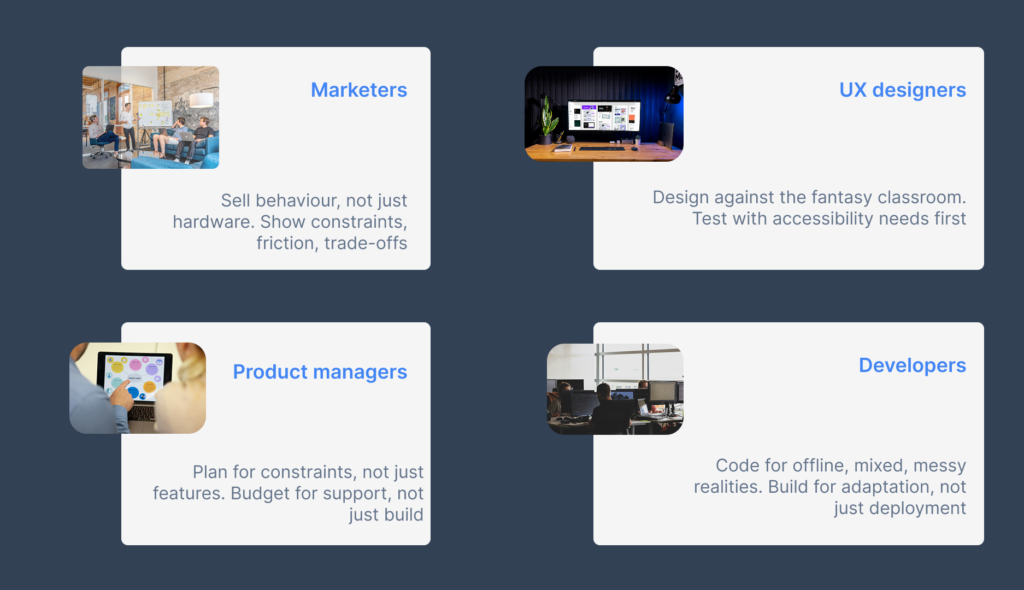
For marketers: sell behaviour, not just hardware
Apple deliberately keeps Neo’s name out of the film while letting its presence be inferred.¹²³ It sells a behaviour loop instead: when something interesting happens, Mac + iPad are how you turn it into learning.
As a result, the takeaway for marketers is twofold:
- First, define the behavioural script you want your product associated with (e.g. “When a problem appears, we’re the first place you go”).
- Second, be honest about who can realistically live inside that script. If your customers have slow data or shared devices, your story must respect those constraints rather than pretending they’ve been solved.
In addition, if you use “inclusion” language, go beyond casting. Point directly to concrete accessibility features, and show them in use. Otherwise, you risk repeating the film’s sleight of hand.
For UX and UI designers: design against the fantasy
Apple has casually raised expectations for classroom UX on its platforms. On Neo and similar Macs, people will expect flows that feel as simple as the ones implied by the film.¹²³
Therefore:
- Be ruthless about distinguishing necessary complexity from avoidable friction. Some flows (safeguarding, reporting) will never be one‑tap; others should be.
- Design first for accessibility: test with VoiceOver, ensure captions work, consider low‑vision and neurodivergent learners in your primary flows—not as an audit at the end.⁶⁰⁶⁸⁷³⁷⁹⁸⁰
- Explicitly design for constrained networks and shared devices. An “offline‑first” classroom experience is not a nice‑to‑have; in many schools, it is the only realistic path.
In short, do not design as if you live in Apple’s film. Design for the classrooms you actually serve.
For product managers: continuity as a strategy, constraints as reality
Viewed as a roadmap, the pairing of Neo and this film is almost old‑fashioned. Apple introduces an entry‑level Mac that inherits mature capabilities and immediately drops it into a story where it feels indispensable but understated.²³¹ It is continuity reframed as access.
For PMs, the obvious lesson is that continuity can be intentional strategy. However, there is a subtler lesson: constraints must be part of that narrative. When you borrow Apple’s behavioural loop, you should also ask:
- Can our “entry‑level” offer genuinely support the core loop, or is it a teaser?
- How do disability, bandwidth and shared hardware change the loop in reality?
- What would it mean to define “ready for every learning opportunity” in a way that includes offline, low‑vision or deaf learners by design?
Your roadmap deck should have specific rows for accessibility and infrastructure, not just for features and AI.
For developers: code for the conditions Apple cuts
Neo’s spec sheet emphasises Apple Intelligence readiness, long battery life and compatibility with the broader Mac app ecosystem.²³⁷⁸ In theory, it is an ideal device for student and teacher workloads. In practice, your code will end up running in far less cinematic conditions.
Consequently:
- Build robust offline workflows, particularly for capture and basic analysis. Assume the network will fail at the worst possible moment.
- Support shared devices, generic accounts and mixed fleets (with older Macs or non‑Apple devices in the same classroom).⁶⁵⁶⁹⁷⁷
- Log and expose useful diagnostics: when your app fails because Classroom shows everyone as offline, make that legible to the teacher and the IT team, not mysterious.⁶⁵⁶⁹⁷⁷⁸¹
If Apple’s film erases friction, your software will earn trust by handling friction visibly and gracefully.
Who is still missing from the frame?
‘We’re learning about the laws of motion.’ In the background, a different law is at work: nothing really moves unless Apple can see it.¹
The lines that anchor the film are simple:
- ‘OK, class, can somebody tell me what kind of birds these are?’¹
- ‘Today we’re learning about flight.’¹
- ‘What happens if we change lift?’¹
- ‘Great job today, class. See you tomorrow.’¹
Each line reasserts human control over a scene in which technology never misbehaves. The flock eventually settles. The devices close. The bell rings. Everyone we see has kept up.
However, the learners we do not see are the ones who should haunt anyone taking this seriously: the student who cannot see the birds and relies on VoiceOver; the one who needs captions or transcripts; the one whose attention collapses when the network stalls and the simulation fails to load; the class that cannot get a consistent Wi‑Fi signal in the first place.⁶⁰⁶⁵⁶⁸⁷³⁷⁷
MacBook Neo makes Apple’s classroom fantasy cheaper. It does not, by itself, make it universal. The interface, in this story, has almost become frictionless. The harder questions—who gets to be “ready”, how we design for the full learning spectrum, and what happens when the network is a bigger barrier than the device—remain outside Apple’s frame. They are, unavoidably, left for the rest of us.
¹ Apple, ‘Apple Education: Ready for every learning opportunity’, YouTube, April 2026.youtube
² Apple, ‘Education – Apple (IN)’.apple
³ Apple, ‘K–12 Education’.apple
⁴ Jamf, ‘Evolving Classrooms: A Comprehensive Look at Apple in Education’, 2023.jamf
⁵ Apple, ‘Education Initiative / Education Impact’.apple
⁶ Apple, ‘Accessibility’ (global and India).apple+1
⁷ Apple and media coverage on MacBook Neo pricing and positioning for students / education.apple+3
⁸ Apple, ‘Discover accessibility features for Apple Education’, ‘Accessibility – Features’, and Apple Education Community resources on iPad/Mac accessibility.apple+4
⁹ Apple Education Community stories and videos on accessibility in real classrooms.education.apple+1youtube+1
¹⁰ Apple Education Community and sysadmin forum threads and YouTube fixes about Apple Classroom offline / connectivity issues.education.apple+2youtube