
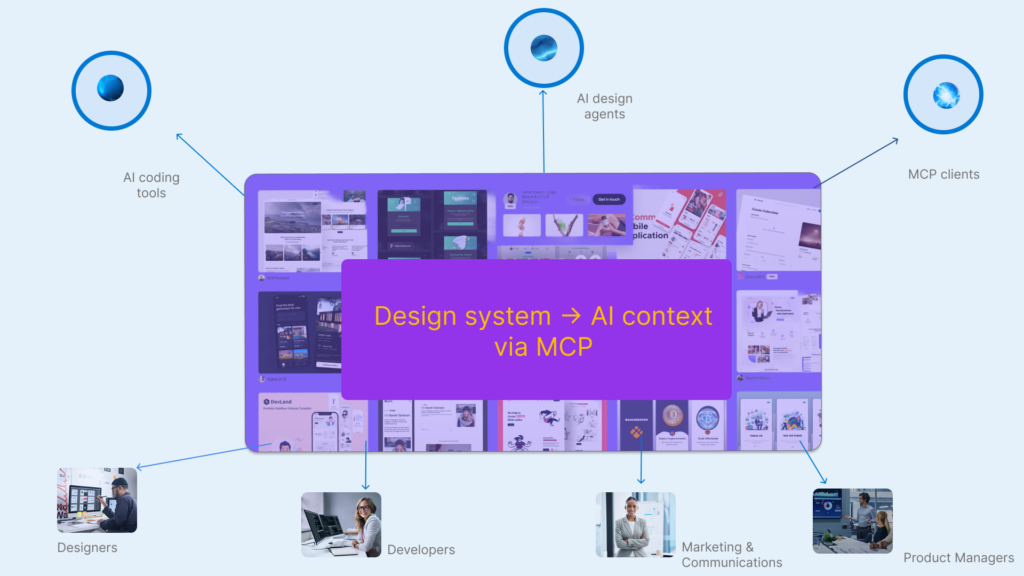
This isn’t just another “AI in design” feature. Figma’s Model Context Protocol (MCP) quietly turns your design file into infrastructure for machines – and whoever controls that file gains a new kind of power over how work gets done.
In other words, Figma is no longer just where design visits before it ships. It is becoming the place AI agents must consult before they act. That shift sounds subtle; its consequences are not.
From canvas to infrastructure
For most of its life, Figma has been the place where work visits before it becomes “real”. Designers sketch flows, developers inspect specs, PMs leave comments, and marketers get tagged on a lonely frame they promise to “circle back” to.
MCP changes that.
At the protocol level, Model Context Protocol is an open standard for how AI-powered systems connect to tools and data sources: a way for models to request context from APIs in a structured, predictable way, rather than hallucinating in a vacuum.¹
Figma has adopted MCP in a very particular way. Through its Dev Mode MCP server, Figma turns the design file from a human-readable source of truth into a machine-readable source of context for AI agents. The server can stream details about components, styles, variables, frames and Code Connect mappings directly into AI coding tools like Cursor, Claude Code, GitHub Copilot and OpenAI-powered editors.² ³
Figma’s own blog calls this “design context everywhere you build” and, in its design-systems writing, talks about “MCP servers as the unlock” for AI designing and coding in your real system instead of a toy one.³ ⁴
On the surface, it sounds tidy:
- no more mismatched colours
- no more developers guessing at spacing tokens
- no more drift between design and implementation
The AI finally looks at the same “source of truth” you do.
However, once the design file becomes infrastructure, a deeper shift appears:
- Whoever controls the Figma file now controls what AI considers “correct” UI.
- Whoever configures MCP decides which contexts AI agents see in their coding environments – and which remain politely invisible.
MCP doesn’t just speed up handoff. It centralises power around those who can encode their decisions into structures that models can parse.
That is the real, urgent shift.
What MCP actually does, technically
To see why this matters, you have to look at the pipeline itself. Figma’s resource library and MCP posts sketch a loop that looks like this:¹ ² ³
- Figma (design system and files)
Components, styles, variables and Code Connect mappings live here. - MCP server (context bridge)
Dev Mode exposes those primitives via MCP so AI tools can query “what does this screen look like?”, “which component should I use?”, “what token is correct here?”.² ³ - AI coding tools (agents)
Tools like Cursor, Claude Code and Copilot call the MCP server to pull design context, then generate UI code aligned with your system.⁵ - Codebase (implementation)
The generated code is written into your repo, ideally using your production components. With Code Connect, Figma can also map components back to those implementations.⁴ ⁶
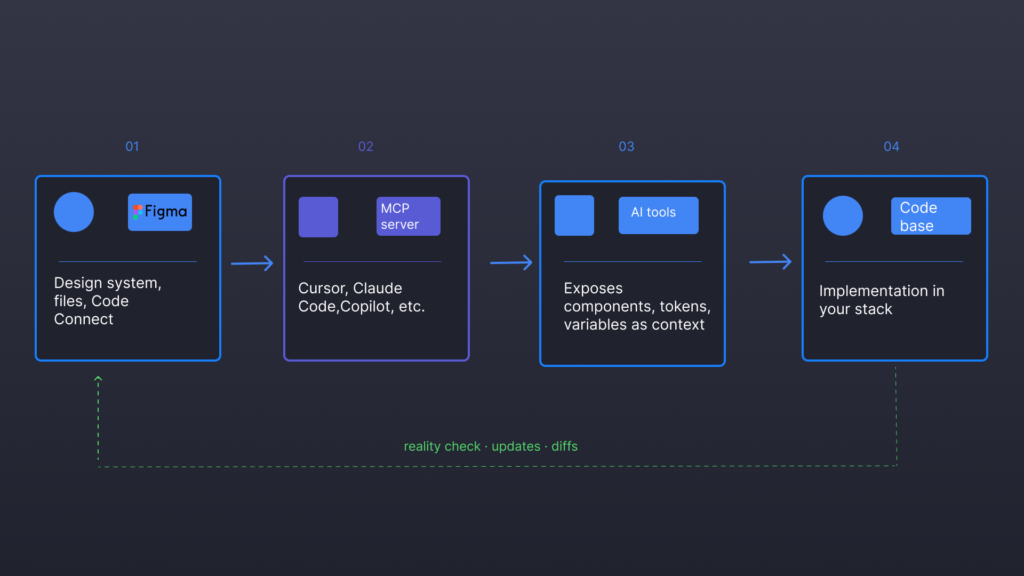
A typical flow:
- A developer opens an MCP-capable editor and asks: “Implement the latest Figma design for the settings page.”
- The editor’s MCP client connects to your Figma Dev Mode MCP server, fetches the relevant frame, and receives a structured description of layout, components and style tokens.¹ ²
- The AI uses that to generate code using your team’s stack, guided by Code Connect mappings that link Figma components to real components.⁴ ⁶
Figma’s product writing sums this up as: AI code generation “is only as strong as the context behind it”, and design systems, piped through MCP, are that context.¹ ³
With the recent MCP expansions, Figma pushes the loop further. It shows agents designing directly on the canvas with your own components and variables, not just reading from finished designs.³ ⁴ The design file stops being a static blueprint and becomes something closer to a live API: AI agents read from it, write to it and keep the system in motion.
On a pure productivity axis, this is compelling:
- For developers: faster, more consistent code that respects tokens and patterns.² ⁵
- For designers: a better chance that your decisions survive the journey to production.³ ⁴
- For PMs: fewer “design vs dev” disagreements over misaligned layouts.
Yet if you zoom out, MCP is not simply “context for AI”. It’s Figma’s bid to sit at the centre of an AI development stack – the place all agents must visit to understand how your product should look and behave. That naturally has consequences for every role in the room.
Designers: from craft to configuration
Figma’s language around MCP and AI is notably restrained. In its “TL;DR on MCP” and its design-system AI posts, you don’t see “AI replaces designers”. Instead, you see:
- “Design context everywhere you build.”³
- “AI that can design directly on the canvas using your components and variables.”³
- “Design systems as productivity coefficients for AI-powered workflows.”⁴
The promise is reassuring:
- If your system is strong, AI will honour it.
- If your components are consistent, AI will use them.
- If your tokens are coherent, AI will stop inventing new shades of blue.
However, embedded in this promise is a quiet redefinition of design work.
Alongside the public posts, Figma has been circulating a Design Systems x AI ebook – a longer-form guide that talks explicitly about making your design system “AI-ready”: structuring components, tokens and documentation so that AI tools can reliably consume them.⁷ ⁴ In that guide and its public DS+AI materials, Figma increasingly frames design systems as inputs to AI workflows, not just libraries for humans.⁴ ⁷
With MCP in the mix, your work is no longer just about solving problems and crafting flows. Increasingly, it is about maintaining the design system as training data for agents:
- Ensuring every reusable pattern is represented as a well-structured component with clear props.⁴ ⁷
- Keeping styles and variables coherent so MCP-exposed tools can apply them predictably.³ ⁴
- Mapping components to production code via Code Connect so AI coding tools can generate implementations with minimal ambiguity.⁴ ⁶
Design systems were already drifting towards governance and operations. MCP doubles down by making legibility-to-machines a first-class requirement.

The risk isn’t that AI “replaces designers”. It’s more subtle:
- Novelty becomes a bug. Anything that lives outside the system is harder for agents to generate, maintain or understand. Over time, this discourages designers from exploring divergent options, especially under product pressure.
- Human taste is mediated by machine legibility. The patterns that proliferate will be those MCP can easily surface and apply – not necessarily the ones that best express the brand or serve complex user needs.³ ⁴
Figma’s DS x AI materials are unusually candid on one point: AI design workflows are only as good as the underlying system governance. If your tokens, components and documentation are chaotic, MCP will simply amplify that chaos at machine speed.⁴ ⁷
Thus, for design leaders, the uncomfortable questions become:
- Are we optimising our design system for human creativity, or for MCP legibility?
- Who decides when to step outside what the AI knows how to replicate?
In Indian teams where design systems already struggle for funding and maintenance, MCP will be tempting as an efficiency lever. It may also become a convenient excuse:
“We can’t deviate; the AI depends on this system.”
That is platform power wearing the clothes of “alignment”.
Developers: convenience, then dependence
Developers are some of the biggest short-term beneficiaries of MCP.
In release notes and Dev Mode posts, Figma presents MCP and Code Connect as a wish list for engineers:
- more consistent translation from design to code
- reduced time spent hunting through Figma files
- tighter coupling between tokens and implemented UI
- fewer “why doesn’t this look like the mock?” conversations² ³ ⁶
Third-party content on AI design‑to‑dev workflows with Figma and MCP reports “orders of magnitude” faster front-end implementation when AI tools can query design context directly.⁵
Day to day, this shows up as:
- Asking an AI assistant in your editor to “build the desktop and mobile variants for the new onboarding flow based on the latest Figma designs” and getting plausible, system-aligned code.³ ⁵
- Letting the assistant query MCP again to validate whether the implemented layout matches structure and tokens in the file.² ³
- Relying on Code Connect mappings so that when an agent picks a component, it’s the real production component rather than a guess.⁴ ⁶
The convenience is real.

So is the trap.
The more you rely on MCP-aware tools for UI work, the more you outsource your mental model of the system:
- Instead of internalising which components exist and how they behave, you ask the agent to look them up via MCP.
- Instead of spotting small inconsistencies in spacing or interaction, you trust that “if it compiles and used the right tokens, it must be fine”.
- Instead of challenging the system when it no longer fits, you accept its constraints because reworking it would break the AI-powered loop you’ve come to depend on.
Figma’s own framing hints at this: if AI is “designing directly on the canvas” and “generating code in your system language”, then a growing share of pattern memory sits in tools, not in people.³ ⁴
In other words:
- You gain velocity.
- You risk losing some of the deep, tacit understanding that makes refactoring and informed deviation possible.
Practically, developers will need new habits:
- Review patterns, not just diffs. If a bad pattern is codified in Figma and exposed through MCP, every AI‑assisted implementation will replicate it. Fix the source, not just the local instance.
- Understand the MCP wiring. Onboarding can’t stop at “clone the repo”. It has to include “here’s how our design system, MCP server and AI tools talk to each other”.² ³
- Preserve some manual seams. Keep certain critical flows implemented with minimal AI assistance, just to retain deep knowledge of how the system actually behaves.
MCP, in other words, is a powerful convenience – but one that shifts developers from authors of UI to curators of AI-generated work constrained by Figma’s worldview.
PMs: alignment at the cost of ambiguity
If you are a product manager, MCP reads like a dream in Figma’s product news.
Recent product updates emphasise:
- stronger alignment between design and dev
- faster iteration on “real, running interfaces”
- reduced friction in design–dev communication³ ⁹
The PM fantasy is easy to see:
- Fewer “this isn’t what we designed” calls.
- AI‑generated implementations that are “on‑brand by default”.
- A world where design and dev are so tightly synced that you can spend more time on strategy and less on arbitration.
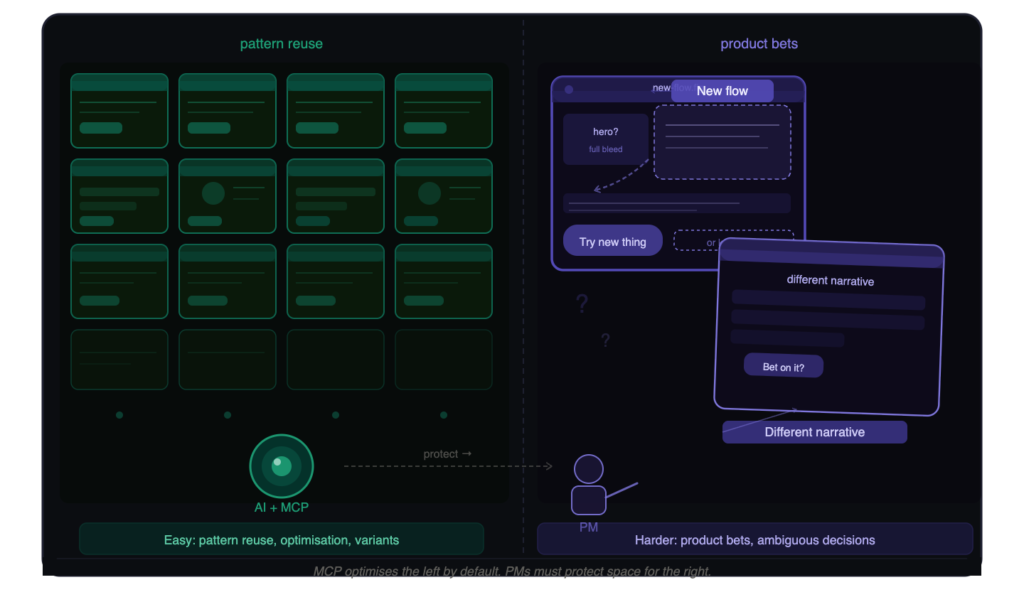
However, MCP also reshapes how PMs relate to ambiguity and risk.
When AI agents can instantly materialise “good enough” flows using the existing system:
- It becomes socially harder to argue for departing from those patterns. Why take a risky bet when the system offers a comfortable default?
- Roadmaps quietly fill with incremental improvements and pattern reapplications, because those are quicker to ship with MCP-linked tooling.
- PMs risk becoming curators of AI-generated options rather than authors of clear, sometimes uncomfortable, product decisions.
The pressure will be to use MCP-driven velocity as evidence of progress: more tickets completed, more variants tested, more features aligned with the design system.
To resist that flattening, PMs will need to:
- Measure depth, not just speed. Track whether MCP-enabled changes actually reduce user confusion, support load and time-to-task – not just whether you shipped more.
- Use speed for divergence, not just polish. If AI can generate three aligned variants of a flow quickly, spend your human time questioning the underlying assumptions rather than only tweaking buttons.
- Set boundaries for automation. Decide explicitly which journeys can be AI‑assisted end to end and which require handcrafted thinking (onboarding, consent flows, pricing, anything deeply tied to trust).
MCP can free PMs from some coordination overhead. It can also make it easier to avoid the harder work of saying: “We shouldn’t just implement faster; we should implement differently.”
Brand and marketing: where the brand disappears
Most of Figma’s MCP and DS+AI messaging is squarely aimed at designers and developers.¹ ³ ⁴ ⁶
Yet MCP has direct implications for brand, content and marketing leadership:
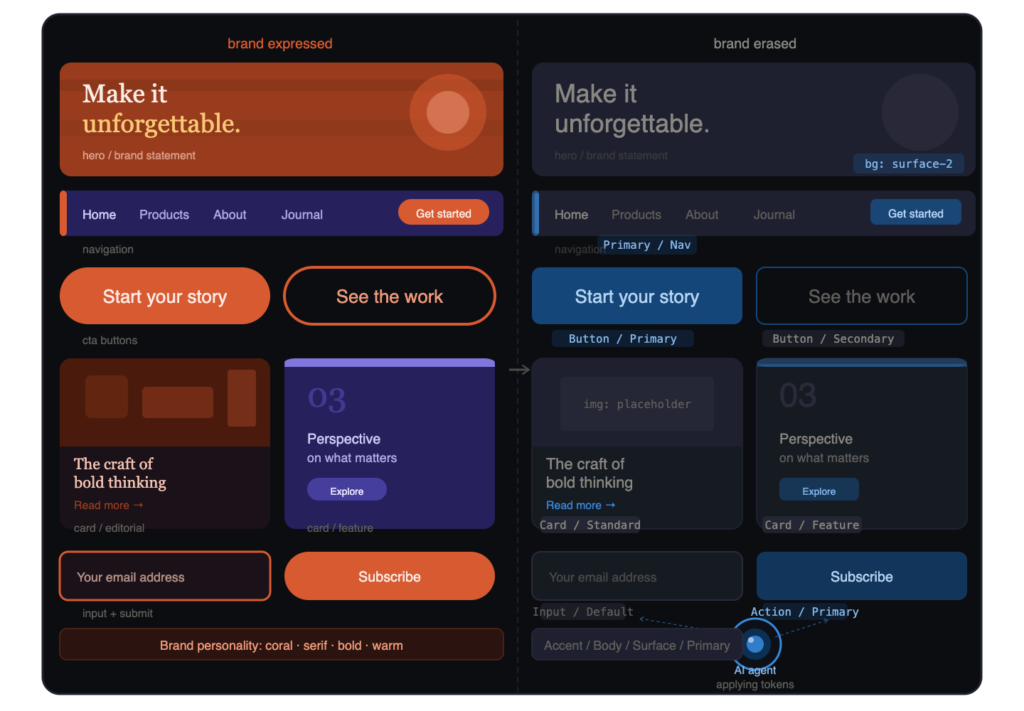
- Once UI decisions are encoded in tokens and components, and exposed via MCP, AI agents will treat those as the limits of brand expression.³ ⁴ ⁷
- If brand and marketing haven’t meaningfully engaged with the design system, their influence on AI‑generated experiences will be incidental at best.
Figma’s Design Systems x AI ebook, combined with its AI design-systems generator, paints an attractive picture: use AI to bootstrap systems, then use MCP to wire those systems into products.⁷ ¹⁰ For a CMO, that sounds like efficiency.
The risk is more existential:
- Anything about your brand that isn’t encoded in tokens, components and guidelines is effectively invisible to the AI.
- Over time, AI-assisted flows will converge on whatever is easiest to express in that system, even if it flattens the brand.
A marketing- or comms-aware version of the MCP launch would have said, plainly:
“If you don’t shape your design system, MCP will decide which parts of your brand are optional.”
That line never appears in Figma’s marketing. It is, however, implied by everything the DS x AI material urges: treat your system as AI-facing infrastructure, invest in its governance, and expect agents to rely on it heavily.⁴ ⁷
For marketers and communications professionals, that means three things:
- Get a seat in the design-system conversation, not just the campaign room.
- Ask where MCP touches user-visible surfaces (onboarding, in‑app prompts, upsell banners, lifecycle emails).
- Frame AI‑assisted execution as “human standards, machine consistency”, not “AI‑designed experiences”.
Otherwise, the brand will be present in decks and absent in the system that actually feeds the agents.
A critique from an AI advocate
This is not an “AI sceptic” piece. In many ways, MCP is AI used well.
Figma’s DS x AI material makes several strong arguments:
- AI design and code generation are only as good as the context you feed them.¹ ⁴
- Design systems provide that context far better than ad‑hoc files and screenshots.⁴ ⁷
- MCP servers are a structured way to expose that context to tools that need it.² ³
On that logic, MCP reduces hallucination, aligns code generation with real systems and forces teams to treat design systems as infrastructure instead of side projects. Those are good outcomes.
The deeper concern lies elsewhere.
The thesis worth stating plainly is:
MCP is not dangerous because it automates design–dev handoff; it is dangerous because it risks turning design systems into the only reality AI can see.
If AI agents only ever see what MCP exposes, then:
- Anything outside the design system—sketches, experiments, hacks that solved real problems—becomes invisible to the tools that increasingly mediate day‑to‑day work.
- The organisation’s imagination of what interfaces could be shrinks faster to what the system already is.
- The parts of the product that are easiest for MCP to represent become the ones that are easiest to change and optimise. Everything else quietly calcifies.
This matters now because:
- AI coding tools are rapidly becoming default, especially in cost‑sensitive ecosystems like India where developer productivity is a hard economic lever.⁵
- Figma is partnering directly with major AI providers (from Codex-style APIs to editor integrations), positioning MCP as the connective tissue between design and code.³ ⁵
- Once that tissue is in place, opting out will be socially, not just technically, hard. No one wants to be the PM or designer who says, “let’s work slower and with less context”.
The risk isn’t that MCP or AI are malicious. It’s that they are extremely efficient at amplifying whatever structure we hand them – including our blind spots.
What practitioners should change now
If you work with Figma and AI, this can’t just be an interesting essay. It should change how you operate.
Designers and UX leads
- Treat the design system as AI-facing infrastructure. Decide which patterns are safe to automate and which require review. Create explicit “no-autogenerate” components for high‑risk flows (payments, consent, health data).
- Design for legibility – but not obedience. Make components and tokens clear enough for MCP to use, while preserving space for pattern-breaking exploration that isn’t wired into the system by default.
- Use crits to interrogate replication. Ask: “If an agent learns from this pattern via MCP, what will it replicate ten thousand times?”
Developers
- Review MCP-driven patterns, not just local diffs. If a bad or outdated pattern is in the system, every AI suggestion will echo it. Fix upstream in Figma, not just in the repo.
- Make the MCP wiring part of onboarding. New engineers should understand how Figma, MCP, Code Connect and your AI tools talk to each other, not only how the codebase is structured.² ³
- Preserve some manual seams as deliberate knowledge. Keep a few critical flows implemented and maintained without heavy agent involvement, to retain deep system understanding.
Product managers
- Measure more than velocity. Track whether MCP-enabled changes reduce friction, confusion and support volume, not just whether you shipped more items.
- Spend human energy where MCP can’t help. Use AI to generate aligned variants quickly, then focus your attention on uncomfortable questions: “Should this flow exist at all?” “Are we asking the user for the right thing?”
- Set AI policy for interfaces. Decide where AI‑generated UI is acceptable in production and where it isn’t, and treat that as product policy, not an engineering detail.
Marketers and communications professionals
- Get into the system, not just the campaign. If your brand values and narrative aren’t encoded in tokens, components and content guidelines, MCP will never see them.
- Ask where MCP touches the brand. Identify journeys where MCP-fed tools influence in‑product messaging, onboarding or growth flows.
- Frame AI carefully in external comms. Avoid promising “AI‑designed experiences”. Emphasise human standards with AI‑assisted execution – responsibility first, speed second.
For deeper context, Figma’s own Design Systems x AI ebook is worth reading not as marketing, but as a map of how your decisions will be consumed by agents over the next two years.⁷
Beyond Figma: context as platform power
Figma is not the only platform doing this.
CRMs, analytics suites and marketing-automation tools are all racing to turn their data into “context” that AI agents can consume. The pattern is consistent:
- Turn your product into a protocol.
- Let AI agents sit on top.
- Sell “context” as the magic bridge.
In practice, this means the owner of the protocol becomes the arbiter of what AI can easily see and do.
In Figma’s case, MCP ensures that AI sees design as Figma defines it: components, tokens, variables, mappings.¹ ² ⁴ That is logical. It is also partial.
What disappears in that translation are the messy bits:
- the half‑finished explorations on a hidden page
- the hacky frames that solved a local problem no one had time to formalise
- the nuanced, narrative choices that sit in heads rather than in tokens
Those are often where the most interesting product thinking lives.
If we let MCP – and protocols like it – become the only lens through which AI understands our work, we risk building a future where:
- Interfaces are more aligned.
- Velocity charts look healthier.
- But our capacity for genuine product judgement quietly declines.
The workflows may be frictionless. The thinking does not have to be.
The opportunity, and the responsibility, is to use MCP as a tool for clarity – without letting it become the boundary of our imagination.
Footnotes
- Figma, ‘What is Model Context Protocol (MCP)? The complete guide’, June 2024.
- Figma Blog, ‘Introducing our Dev Mode MCP server’, June 2025.
- Figma Blog, ‘The TL;DR on MCP: Why context matters and how to put it to work’, April 2026.
- Figma Blog, ‘Design Systems and AI: Why MCP servers are the unlock’, August 2025.
- SixtyThirtyTen, ‘From Figma to code: AI design-to-dev workflows in 2026’, February 2026.
- Figma, ‘Code Connect’ and related Dev Mode documentation.
- Figma, Design Systems x AI (PDF ebook), internal/marketing guide on making design systems AI-ready and MCP-aware, 2025–2026.
- TechCrunch, ‘Figma partners with OpenAI to bake in support for Codex’, February 2026.
- Figma, ‘Product news & release notes’, entries on MCP and AI updates, 2025–2026.
- Figma, ‘AI Design Systems Generator: Build smarter, faster with Figma Make’, January 2026.