
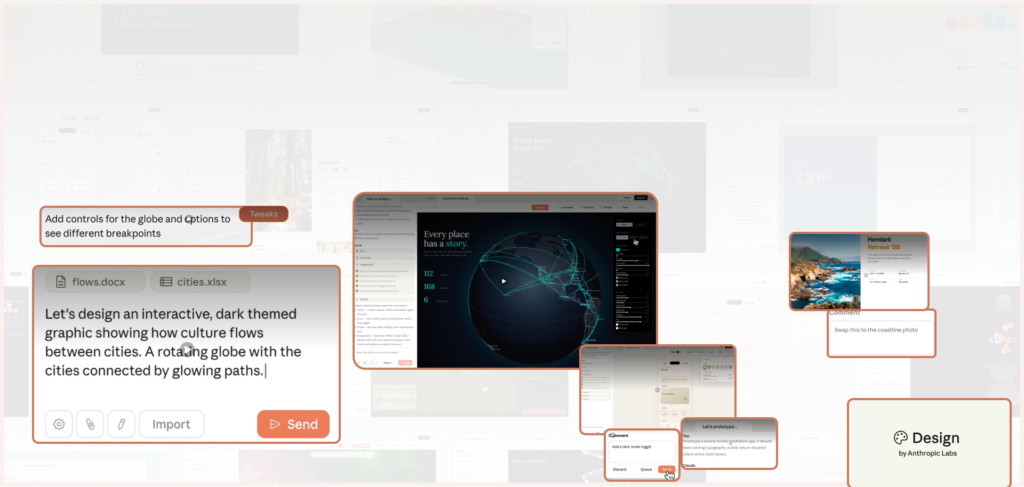
Anthropic’s launch video for Claude Design is the kind of trailer you can scroll past in 82 seconds and forget. Under the hood, though, it marks a quiet shift: AI that doesn’t just write copy for you, but actively composes the formats you think in—designs, prototypes, pitch decks, one-pagers.
The video is called “Introducing Claude Design by Anthropic Labs” and lives on YouTube here:
“Claude Design is a new Anthropic Labs product that lets you collaborate with Claude to create polished visual work like prototypes, slides, one-pagers, and more.”
Short video. Big claim.
What Anthropic is actually shipping
The real substance is not in the video. It’s in Anthropic’s launch post:
Anthropic opens with:
“Today, we’re launching Claude Design, a new Anthropic Labs product that lets you collaborate with Claude to create polished visual work like designs, prototypes, slides, one-pagers, and more.”
A few important details from that page:
- Claude Design runs on Claude Opus 4.7, Anthropic’s most capable vision model for coding, agents, vision and multi-step tasks.
- It is in “research preview” for Claude Pro, Max, Team and Enterprise accounts, and org admins have to explicitly switch it on.
- It is aimed at both experienced designers and people who don’t think of themselves as designers at all—founders, PMs, marketers.
“Even experienced designers have to ration exploration—there’s rarely time to prototype a dozen directions, so you limit yourself to a few. And for founders, product managers and marketers with an idea but not a design background, creating and sharing those ideas can be daunting.”
Translation: everybody is overloaded, and most decks and prototypes are still being hacked together manually.
What it gets right:
this is exactly where AI feels like a win. If you’ve ever been the PM in a mid-size Indian SaaS team trying to design “just one more” investor deck or onboarding flow at midnight, the promise of a tool that does the first 80% of layout is extremely welcome.
What we should watch:
because the pitch speaks so directly to our pain, it can be easy to forget that this is still a Labs-phase product. Anthropic itself stresses that Labs exists to explore frontier capabilities and scale them responsibly if they prove useful—Claude Design fits that brief, which means it will evolve under our feedback, not above it.
From text box to multimodal workbench
Most people still experience large language models inside a rectangle: you type, they reply. If they give you slides or PDFs, it’s usually as an export bolted onto chat.
Separately, there’s a growing ecosystem of AI pitch-deck tools that promise “deck in minutes” from a prompt or a URL: Gamma, Storydoc, Beautiful.ai, Plus AI, Magicslides and their friends. If you’ve ever gone hunting for them, you’ve probably seen lists like:
- Hebbia’s “10 Best AI Pitch Deck Generators”
- Sell AI Tool’s “AI Pitch Deck Generator: How to Find the Best Tools in 2025”
- GoDesignGuru’s “Best AI Tools for Pitch Decks in 2025”
- Storydoc’s own “AI Pitch Deck Creator”
Most of these tools are text-first and template-heavy. You feed them content, they wrap it in a theme.
Claude Design flips that around. Anthropic describes it as a place to design with Claude:
“Claude Design gives designers room to explore widely and everyone else a way to produce visual work. Describe what you need and Claude builds a first version.”
The critical bits:
- It runs on a vision-capable model (Claude Opus 4.7), so it’s meant to reason about layout and visual structure, not just text.
- Designs, prototypes, slides and one-pagers are the primary outputs, not exports.
- The interface is a canvas plus conversation: prompts, inline comments, direct edits, and even “custom sliders (made by Claude)” for fine-tuning.
“From there, you refine through conversation, inline comments, direct edits, or custom sliders (made by Claude) until it’s right.”
This is less “chatbot that sometimes spits decks” and more “design workbench where the main control surface is language”.
What it gets right:
it treats visual format as first-class work. It’s not just exporting bullet points into slide templates; it is using a capable vision model to structure prototypes, decks and one-pagers as native artefacts.
What we should watch:
when a tool is this good at giving you a plausible first version, the burden shifts onto your brief. Vague in, vague out—just prettier. If you’re an AI advocate, this is where the craft moves: from drawing rectangles to writing tighter, more responsible prompts.
“Collaborate with Claude” is doing a job
The word choice is not accidental. Anthropic keeps repeating that you collaborate with Claude. It never says “press a button, get a full design”.
That one verb does three jobs:
- It frames Claude as co-designer, not usurper. Claude drafts a first version; humans edit and direct.
- It makes space for granular control: inline comments on specific elements, knobs for spacing and colour, sliders to nudge density and complexity.
- It calms automation panic. “Room to explore widely” and “a way to produce visual work” is very different energy from “we replaced your design team”.
“Claude Design gives designers room to explore widely and everyone else a way to produce visual work.”
Designers keep their taste and judgment. Everyone else gets a half-decent canvas.
What it gets right:
if you already use Claude the chatbot, this feels familiar. It’s the same “smart partner” idea, extended to layout. You’re not giving up control; you’re giving up drudgery.
What we should watch:
collaboration can quietly turn into rubber-stamping. If you’re tired, or under pressure, it’s easy to accept a good-looking draft without really interrogating the story or hierarchy. Being pro-AI here means committing to still doing the thinking—Claude Design can handle defaults; only you can decide what actually matters.
Who it’s really for: designs, prototypes, decks, one-pagers
Anthropic doesn’t talk in abstractions; it lists actual use-cases from early teams:
- Realistic prototypes: turn static mockups into interactive prototypes “to gather feedback and user-test, without code review or PRs”.
- Product wireframes and mockups: PMs sketch flows and hand them off to Claude Code or to designers.
- Design explorations: quickly exploring alternative visual directions.
- Pitch decks and presentations: move from outline to a “complete, on-brand deck in minutes” and export as PPTX or push to Canva.
- Marketing collateral: landing pages, social assets, campaign visuals.
- “Frontier design”: prototypes with voice, video, shaders, 3D, and built-in AI behaviour.
All of these examples are described on the Anthropic launch page.
“Founders and Account Executives can go from a rough outline to a complete, on-brand deck in minutes, and then export as a PPTX or send to Canva.”
So yes, this is for designers. But it is also for PMs, founders, AE teams, marketers—all the people whose careers quietly run on prototypes and pitch decks.
What it gets right:
it meets people where they actually live—slides, prototypes, one-pagers—rather than forcing everyone into Figma or PowerPoint if they’re not comfortable there.
What we should watch:
being able to generate whole decks and flows this quickly can tempt teams to skip the hard, boring parts: validating with users, aligning on narrative, checking with legal or compliance. The tool accelerates what you ask it to build; it doesn’t decide whether that thing should exist in the first place.
“Polished visual work” and the design-system angle
The most ambitious promise is not speed; it’s polish. Anthropic leans hard on brand systems:
“Your brand, built in. During onboarding, Claude builds a design system for your team by reading your codebase and design files. Every project after that uses your colors, typography, and components automatically.”
If that works as advertised, it’s a jump beyond most AI slide tools, which basically ask for a logo and a colour pick.
Claude Design wants to:
- Read your actual codebase and design files.
- Infer the design tokens and components that describe your brand.
- Apply them automatically to prototypes, decks and marketing assets.
“When given access, Claude can also apply your team’s design system to every project automatically, so the output is consistent with the rest of your company’s designs.”
Consistency as an API.
What it gets right:
this is where the value really compounds. You don’t just get “pretty slides”; you get outputs that look like they belong to your product and marketing ecosystem, and can be edited further in tools like Canva thanks to export options.
What we should watch:
when everything is that on-brand, it becomes even more important to notice when the ideas are off. It’s easier than ever for a weak product narrative to look legit, because the design system wraps it in the right colours and type. In practice, this means product and design leadership have to sharpen their review muscles: not “does this look like us?”, but “does this actually say what we believe?”
Where it sits in the current AI–design stack
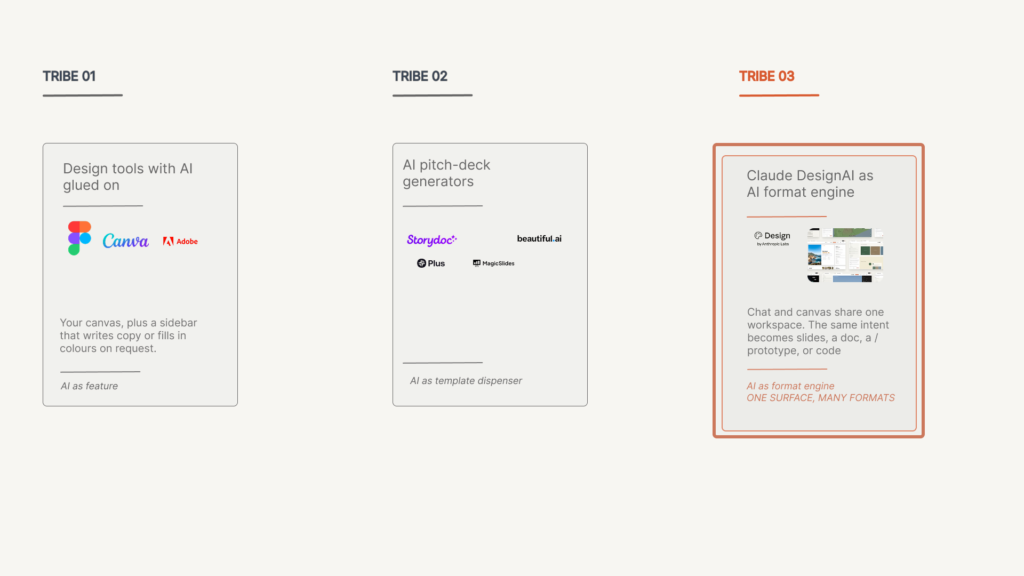
Claude Design drops into a stack that already has three tribes:
Design tools with a bit of AI glued on
Figma, Adobe, Canva and others now ship AI helpers for copy, images and layouts. In all of them, AI is a side-panel. The tool came first; AI was glued on top. Claude Design is the opposite. The model (Claude Opus 4.7) is the centre. The interface is built around what the model can see and change.
AI pitch-deck generators
There’s now an entire sub-genre of “pitch-deck from prompt” tools. If you’ve seen reviews like Hebbia’s “10 Best AI Pitch Deck Generators” or Storydoc’s “AI Pitch Deck Creator”, you know the pitch: give us your idea or URL, we’ll give you a slick deck. Claude Design overlaps heavily here—Anthropic is quite happy to talk about “complete, on-brand decks in minutes”—but extends sideways into product wires, prototypes and landing pages, and downwards into code via Claude Code.
AI summarisers that spill into slides
Another cluster of tools starts from documents, not ideas. Xmind AI, SlideSpeak and PDF.ai, for instance, focus on summarising PDFs and long reports and sometimes convert those summaries into presentations. Their flow is: PDF → summary → structured slides.
Claude Design’s flow is: intent → structure → design, with optional imports from docs, codebases or live web capture.
“Import from anywhere. Start from a text prompt, upload images and documents (DOCX, PPTX, XLSX), or point Claude at your codebase. You can also use the web capture tool to grab elements directly from your website so prototypes look like the real product.”
The centre of gravity is creation, not just condensation.
What it gets right:
it fills a real gap—not just “summarise this into slides”, but “help me invent the structure and visuals from scratch, based on what I’m trying to do”
What we should watch:
because it’s a new category, teams will need to develop new instincts. We already know how to judge a Figma file or a human-authored deck; we’re still learning how to judge a conversationally generated prototype. The weakness, for now, is more about our literacy than about the model’s.
How the workflow is meant to feel
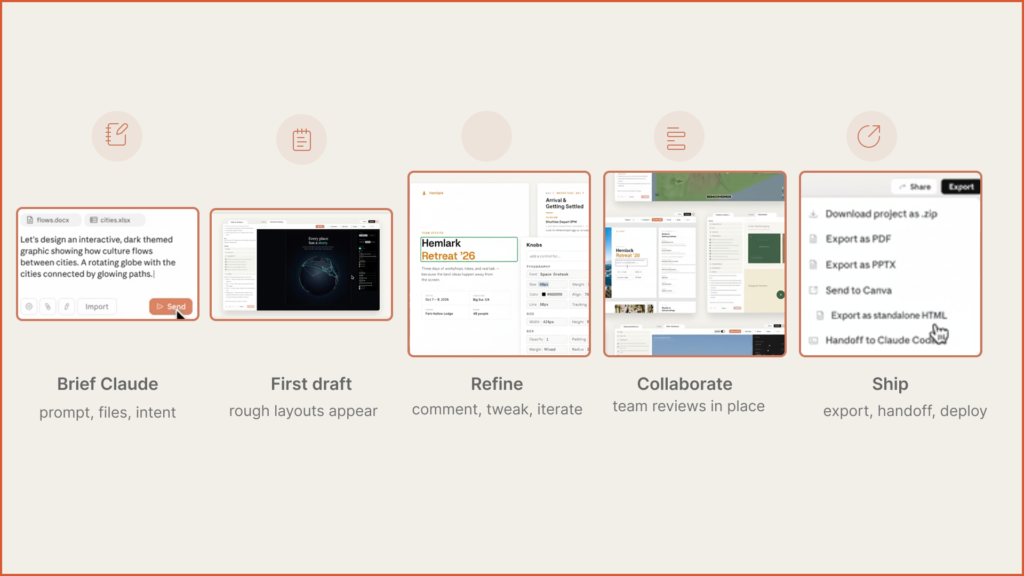
The launch post outlines a fairly clear creative loop:
- You brief Claude Design
You start with a prompt, or upload docs, or point it at your code, or capture parts of your live site. - Claude builds a first version
It applies whatever brand system it has learned and assembles a first prototype, deck, wireframe or landing page.
“Describe what you need and Claude builds a first version.”
- You refine via comments and knobs
You comment inline on specific elements, edit copy directly, tweak spacing and colour with adjustment knobs, or manipulate custom sliders Claude created for you. - You collaborate with colleagues
Designs live inside your organisation, with view / edit links. You can all talk to Claude about the same artefact in a group conversation.
“Designs have organization-scoped sharing… colleagues can modify the design and chat with Claude together in a group conversation.”
- You export or hand off to Claude Code
When you’re happy, you export to Canva, PDF, PPTX, or HTML. Or you tell Claude to package everything into a “handoff bundle” for Claude Code to implement.
“When a design is ready to build, Claude packages everything into a handoff bundle that you can pass to Claude Code with a single instruction.”
It’s basically: brief → first draft → refine → collaborate → ship.
What it gets right: it mirrors how cross-functional teams actually work. This is aimed at founders and product managers who need to share ideas more easily with their teams, not at replacing design studios outright.
What we should watch: because the whole loop can stay inside Anthropic’s ecosystem (Claude Design → Claude Code), there’s a subtle lock-in question. For many teams that’s a feature, not a bug, but as an advocate you’ll want to keep one eye on portability: how easy is it to move these flows into other tools if your stack changes?
What this does to designers
For designers, Claude Design is both an accelerant and a challenge.
On the accelerant side:
- You can turn static mocks into interactive prototypes without asking engineering for a build.
- You can explore more directions, because assembling “good enough” variations is cheaper.
- You can propagate your design system into more corners of the org without hand-holding every internal deck.
On the challenge side:
- If AI handles most “acceptable” layout, junior designers get fewer reps in the fundamentals.
- The argument for design might have to move even further away from pixels and toward research, testing, and experience strategy.
The optimistic view is that tools like this lift the floor and free up designers to work on the ceiling.
My bias as an AI advocate: I’m not interested in defending pixel-pushing as a sacred ritual. If Claude Design can do a competent job of on-brand layout, I’d rather see human designers focus on the parts machines are bad at: qualitative research, tricky interaction patterns, cultural nuance, weird experiments that haven’t made it into the training data yet.
What this does to everyone else
For PMs, founders, sales and marketing, the appeal is obvious.
Anthropic highlights founders going from rough outline to on-brand deck “in minutes”, marketers spinning up landing pages and social assets before looping in designers, and AEs exporting to PPTX or Canva.
“Marketers can create landing pages, social media assets, and campaign visuals, then loop in designers to polish.”
This puts Claude Design in competition with Gamma, Storydoc, Beautiful.ai, Plus AI and others—but with a deeper integration into product flows and code.
The underlying message to non-designers is simple: you no longer need a blank slide and a prayer to get something half decent.
What it gets right: it gives everyone else a way to share ideas visually without waiting in a design queue. That is a big deal in fast-moving Indian product teams where design is often under-resourced.
What we should watch: speed doesn’t automatically mean alignment. When “just spin up a deck” becomes trivial, you can end up with multiple parallel versions of the story—sales has one, product has another, founders have a third. The governance problem becomes narrative, not visual.
An Indian lens: democratisation and sameness
From an Indian perspective—Hyderabad, Bangalore, Gurgaon, Mumbai—the implications are slightly different.
On one hand:
- Small teams without in-house design can suddenly turn Notion-level ideas into prototypes and decks that don’t look like 2007 PowerPoint.
- Local context—RBI guidelines, UPI flows, Tier-2 user behaviour, festival-driven sales cycles—can be baked directly into prompts, instead of forcing everything through generic US-centric design patterns.
On the other hand:
- There is a very real risk that if everyone leans on similar AI defaults, Indian products and pitches start to look like mildly localised clones of Bay Area SaaS decks. You can already see that tendency in some AI-generated decks and landing pages from tools like the ones in the Hebbia / Sell AI Tool / GoDesignGuru roundups.
The job, then, is to treat Claude Design as infrastructure (consistency, speed, exports) and still insist on a distinct visual and cultural voice.
If you care about India’s design language, that’s actually an exciting brief: how do we prompt Claude Design so that “Indian fintech”, “Hyderabad edtech”, or “Delhi policy deck” start to feel like recognisable genres in their own right?
The awkward questions (for fans, not haters)
The launch page is understandably optimistic. A few questions sit just off-screen—not as gotchas, but as prompts for people who want this to work well:
- What does “good design” mean to a model trained mostly on Western patterns? How opinionated is it about accessibility, multi-script layouts, or low-end device realities?
- How exactly are codebases and design files handled in terms of privacy, training and residency? The page says Claude Design is off by default and must be enabled by admins, but leaves the deeper governance story for follow-up docs.
- Does automating “good enough” layouts free designers or blunt their craft—and what training do we put in place to make sure juniors still learn the basics?
- How much bias in imagery, metaphors and “professional” aesthetics sneaks in via training data—and how easy is it to steer away from that in sensitive contexts?
None of these are reasons to avoid Claude Design. They’re more like a checklist for serious adopters: if you’re going to lean on this tool, you owe it to yourself to have answers.
Anthropic’s broader line on Claude is all about safety and control, and Claude Design is explicitly launched under Anthropic Labs, the experimental wing meant to explore these questions openly. As users, we get to shape how that plays out.
The pattern underneath: AI as format engine
The interesting thing about Claude Design isn’t just that it can make decks or prototypes. It’s the category it quietly claims.
We’re drifting from AI as content generator (“write this email”, “summarise this PDF”) into AI as format engine: systems that help decide how ideas should be staged, sequenced and visually argued.
Prototypes, slide decks and one-pagers are not just documents. They are thinking formats. They structure how teams see problems and how they decide.
“Claude Design gives designers room to explore widely and everyone else a way to produce visual work.”
Used lazily, it will churn out beautifully structured nonsense. Used with taste—and with some attention to local context—it could end up shaping not just how things look, but how teams think in the first place.
As an AI advocate, that’s the version I care about: not AI that replaces designers, but AI that forces all of us—designers, PMs, founders—to be clearer about what we’re trying to say, and more deliberate about the formats we say it in.
Sources
Anthropic launch materials
- YouTube: “Introducing Claude Design by Anthropic Labs” – https://www.youtube.com/watch?v=t_LBECIQQqs
- Anthropic blog: “Introducing Claude Design by Anthropic Labs” – https://www.anthropic.com/news/claude-design-anthropic-labs
AI pitch-deck and slide tools
- Hebbia: “10 Best AI Pitch Deck Generators” – https://www.hebbia.com/resources/ai-pitch-deck-generators
- Sell AI Tool: “AI Pitch Deck Generator: How to Find the Best Tools in 2025” – https://sellaitool.com/blog/ai-pitch-deck-generator
- GoDesignGuru: “Best AI Tools for Pitch Decks in 2025 (And Why Design Agencies Still Matter)” – https://www.godesignguru.com/blog/the-best-ai-tools-for-pitch-decks-in-2025
- Storydoc: “AI Pitch Deck Creator: Get Funded and Win Deals” – https://www.storydoc.com/pitch-deck-creator
AI summarisation → slides
- Xmind Blog: “5 Best AI PDF Summarizer Tools for Quick Document Review in 2025” – https://xmind.com/blog/ai-pdf-summarizer
- SlideSpeak: “Summarize PDF with AI” – https://slidespeak.co/features/summarize-pdf-with-ai
- PDF.ai: “The 10 Best AI Summarizers” – https://pdf.ai/resources/best-ai-summarizer