
Somewhere between a cluttered tmux grid and a terminal window waiting for approval, the coding assistant stopped being a helper and became a workflow. Anthropic’s work on Claude Code, Model Context Protocol (MCP) and agent view is not just another lap in the AI coding race. It is a bid to turn the development environment into a governed network of agents, tools and permissions, where the real product is no longer the chat response but the shape of the work itself.
Developers should care because the competitive battle has shifted. Cursor still feels faster at the file-and-folder layer. GitHub Copilot still owns mindshare in autocomplete and enterprise distribution. Claude Code, though, is trying to own something more structural: the terminal as an orchestration surface, and MCP as the protocol that makes external tools part of the model’s working environment rather than an afterthought.
That same logic now shows up in Anthropic’s customer storytelling. In Anthropic’s May 2026 conversation with Makund, CEO of Emergent, the company describes long-running, multi-agent app-building systems that prioritise reliability, deployment, testing, security and durable production outcomes over flashy one-shot demos. That is exactly the terrain where Claude-style orchestration beats a thin ‘AI editor’ framing.
Product managers and designers should care for a different reason. Once the assistant can pull from issue trackers, monitoring dashboards, databases, Slack, GitHub and internal APIs, the system is no longer just generating code. It is deciding what information enters the room, in what order, under whose permissions and with what visible evidence.
The standard industry line is that coding assistants are converging into one category, with a few interface differences around chat, autocomplete and edit modes. That reading is already outdated. The real split now is between tools that speed up coding inside an editor and tools that reorganise how development work is delegated, approved and traced across systems.
‘The assistant is no longer competing on how well it writes a function. It is competing on how much of the workflow it can quietly absorb.’
That is why MCP matters. Anthropic introduced the Model Context Protocol in late 2024 as an open standard for connecting AI assistants to external systems, from GitHub and Postgres to Slack and Google Drive. Anthropic’s “How Claude Code Works” walkthrough also frames Claude Code as an agentic loop that gathers context, takes action, verifies results and repeats inside a managed permission model rather than acting like a static code generator. Claude Code’s implementation goes well beyond a generic connector story. It supports local stdio servers, remote HTTP and SSE servers, project and user scoping, OAuth, dynamic headers, managed allowlists and denylists, and a tool-search system that defers tool definitions until they are needed.
This is not merely a feature. It is a position. Anthropic is betting that the most valuable coding product in 2026 will not be the assistant that looks most magical in an IDE demo. It will be the one that can sit at the centre of real engineering work without collapsing under tool sprawl, permission chaos or context bloat.
The competitive frame has changed
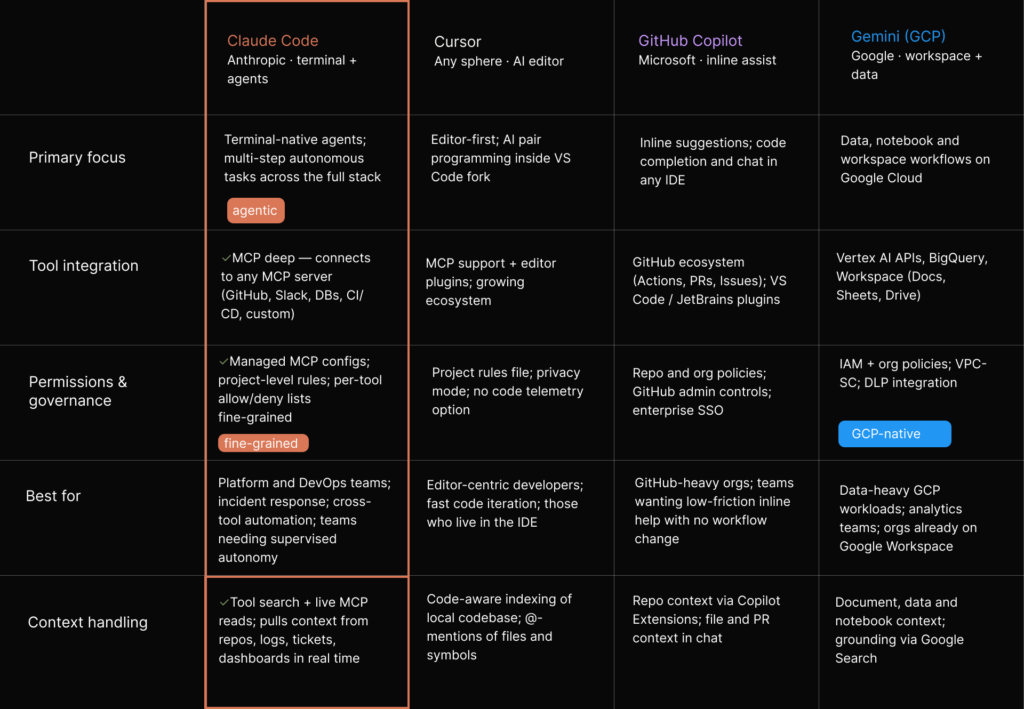
If the old comparison was Copilot versus Cursor versus Claude Code as three flavours of ‘AI for developers’, that frame no longer holds. Copilot still dominates the most familiar territory: inline suggestions, low-friction adoption, and tight coupling to GitHub’s distribution and workflow stack. Cursor still has the cleaner story for developers who want a repo-aware editor that can index a codebase, make coordinated multi-file changes and stay close to the IDE-centric habits they already have.
Beyond the IDE
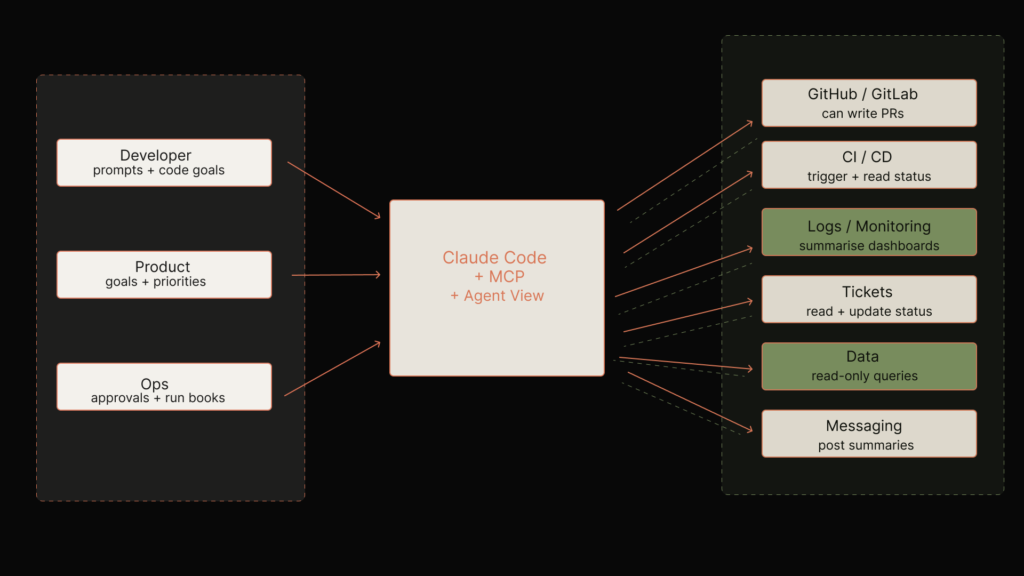
Claude Code sits between people and tools, using MCP and agent view to orchestrate PRs, CI, logs, tickets, data and messaging rather than living only inside an editor.
Claude Code is going after a different centre of gravity. It is terminal-first, not editor-first. Its strongest claim is not that it autocompletes better than Copilot or edits faster than Cursor. The stronger claim is that it can read, edit, run, test, debug and coordinate work across an entire project while reaching into external tools through MCP.
That distinction matters because developer adoption in 2026 is not only about raw coding speed. Teams are asking sharper questions now. The real questions are sharper now. Which assistant can genuinely help with production debugging and still move easily across services and dashboards? Can it touch internal systems safely, fit existing approval flows, and be standardised without creating a compliance nightmare?
Those are not autocomplete questions. They are workflow and governance questions.
Agent view as a strategic move
Anthropic’s agent view sharpens that positioning. Launched in May 2026, it gives Claude Code users a single place to manage active, blocked and completed sessions, with inline replies and background execution for long-running work. Anthropic’s own examples are telling: parallel sessions, PR babysitters, dashboard updaters, quick codebase questions and loops that run in the background until they need a human decision. That fits neatly with Anthropic’s own explanation of Claude Code as software that plans, acts, checks and asks for permission when needed, rather than merely replying in a chat box.
This is a move away from ‘ask the AI something’ and towards ‘run a small fleet of bounded software workers and supervise them’. Cursor has agentic features and Copilot has broader ecosystem reach, but Anthropic is explicitly productising the supervision layer.
‘Cursor helps with the edit. Copilot helps with the keystroke. Claude Code wants to help with the shift.’
Who this approach suits
That makes Claude Code compelling for a certain kind of developer: staff engineers, DevOps-heavy teams, platform teams, product-minded builders and anyone whose day is split between shell commands, logs, tickets, dashboards, pull requests and ad hoc scripts. It is less obviously compelling for the developer who spends eight uninterrupted hours in a single IDE and mainly wants better completion and refactoring.
Anthropic is not trying to win every coding interaction. It is trying to own the messy, high-leverage ones. The Emergent interview reinforces this divide from another angle. Users comparing AI builders to dev shops are optimising for outcome quality, verification loops and production readiness rather than raw latency. That is increasingly how serious buyers are judging agentic development products.
Claude Code leans into terminal‑native agents and fine‑grained MCP governance, while Cursor, Copilot and Gemini focus on editor, GitHub and data‑centric workflows.
MCP is really about authority
The polite way to describe MCP is that it is a universal integration standard for AI tools. A more useful description is this: it is a protocol for deciding what the model is allowed to know, touch and do.
Permissioning is the real product
Claude Code’s MCP documentation makes the architecture sound simple enough. Connect a server, let Claude read from or act on a tool, and avoid pasting information into chat by hand. The security and permission model reveals the real significance. Servers can be installed at local, project or user scope. Project-scoped servers can be checked into version control via .mcp.json. They also require approval before use. Organisations can take exclusive control through managed-mcp.json or apply allowlists and denylists for commands and URLs.
OAuth scopes can be pinned to a security-approved subset. Even dynamic headers can be generated through helper scripts at connection time. Put together, those controls mean Claude Code is not just connecting to tools. It is defining an approved perimeter of AI action.
Why small-company adoption gets tricky
At that point, Claude Code becomes more than a coding tool. The repository can now carry not just application logic but an approved AI capability boundary. The MCP configuration defines what systems the assistant can reach, how it authenticates, which scopes it may request, which transports are permitted, and whether the organisation allows individual developers to add their own tools at all.
The Emergent discussion adds an important market-level implication. When agentic builders start serving non-coders and small businesses at scale, the risk profile of permissions changes again. Users who cannot meaningfully debug model behaviour depend much more heavily on guardrails, deployment checks and post-deployment monitoring. In that world, Claude’s security posture is not an abstract best practice. It becomes a question of whether the platform can safely act on behalf of people who are delegating outcomes rather than inspecting implementation.
The upside and the risk
In practice, that changes the politics of adoption inside engineering organisations. Tool choice is no longer just a matter of personal preference or productivity hacks. The moment an assistant can access GitHub, Sentry, Statsig, a production database or internal APIs through MCP, adoption becomes a question for security, platform, legal and IT as well as engineering.
There is a strong upside here. Anthropic’s managed MCP controls are unusually explicit and useful. Enterprises can deploy a fixed set of approved servers, block untrusted endpoints, or restrict stdio commands by exact match. OAuth scopes can be narrowed. Project-scoped servers prompt for approval. Servers that need browser authentication can use predictable callback ports.
Even so, the security story is not cleanly solved. The more tools Claude can reach, the more dangerous misconfiguration becomes. Dynamic headers run arbitrary shell commands. Local stdio servers are local processes. Tool access can expand through plugins. Remote servers depend on external trust assumptions. Governance can also drift when teams check useful-looking MCP configurations into projects without a serious review path. Anthropic’s own product explanation makes clear that permission modes are a core part of Claude Code’s operating model, which is useful, but it also underlines how much safety depends on sensible defaults and careful human review.
LinkedIn and Reddit discussions around Claude Code have increasingly fixated on this tension. Some power users celebrate reduced interruptions by running in containers or bypassing repeated prompts. Others warn that giving agents programmatic access to sensitive environments through MCP changes the threat model more than many teams admit. That tension will not disappear. It is the point.
‘Every time a team says the agent should “just have access”, they are making a policy decision, not a convenience decision.’
What good governance looks like
The best mitigation is not to retreat from MCP. It is to separate kinds of authority. Platform teams should govern exposure: which servers are allowed, which transports are acceptable, which scopes are pinned, and which commands can run. Domain teams should govern workflow: what tasks Claude may automate, what outputs are advisory, what actions require review, and what logs must be retained.
Without that split, ‘developer productivity’ becomes a back door for undiscussed operational policy.
Agent view is useful when work has stalls, loops and approvals
Agent view is easy to dismiss as interface polish. It is not. It signals what Anthropic thinks agentic coding actually looks like in teams: not one miraculous coding run, but many partial, asynchronous sessions that progress until they hit a decision, a failure or a permission boundary.
Where teams will actually use it
The strongest use cases are not flashy demos. They are ordinary, messy team patterns:
- Long-running tasks such as test generation, dependency upgrades, dashboard updates or repetitive PR maintenance, where the work mostly proceeds on its own but occasionally needs intervention.
- Parallel explorations, where one session investigates a bug, another drafts a fix, another checks logs or dashboards through MCP, and another prepares a pull request.
- Background monitoring of external events, where channels or integrations can push updates into a session and Claude reacts when CI fails, an alert fires or a message arrives.
- Handoffs between humans and agents, where a session blocks on an approval, a product decision or a missing credential, then resumes when a team member replies inline.
That maps well to the reality of product and platform teams in 2026. The job is increasingly fragmented across planning, coding, QA, deployment, observability and coordination. Developers are not just writing functions. They are supervising systems. Agent view acknowledges that and gives the supervision labour an interface.
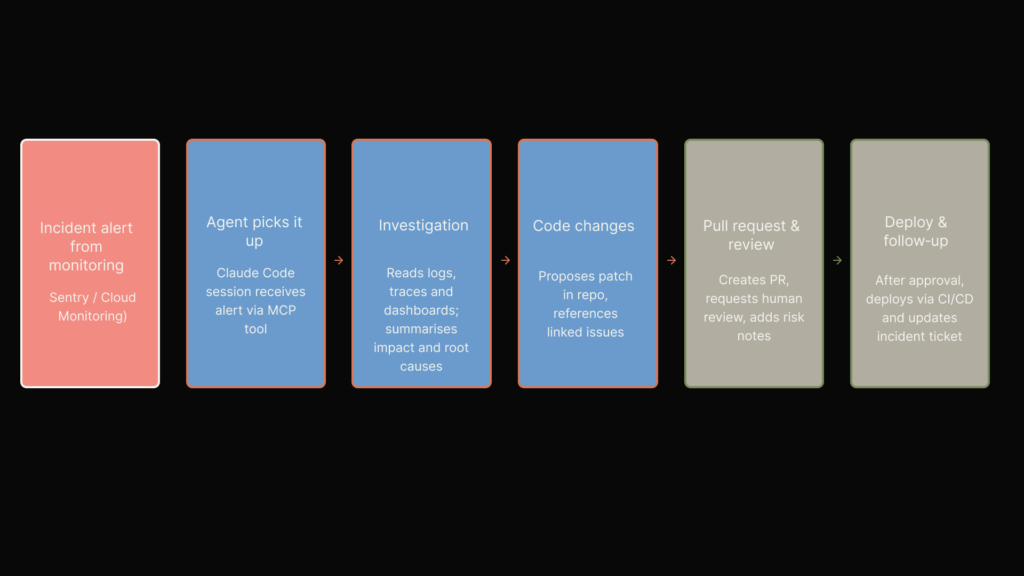
Claude Code can pick up an incident alert, investigate logs and dashboards, propose a patch, open a PR and support deployment, while humans keep control at approval points.
Why designers should care
Designers should notice something else: the feature also solves a trust problem. When multiple agents are running, the crude version of the workflow is a pile of terminal tabs or tmux panes and a heavy mental ledger. Agent view turns that invisible orchestration into something legible enough to scan. It does not make the work fully explainable, but it does surface status, recency and blocked states.
In a market full of ‘autonomous agent’ rhetoric, that is a meaningful design move.
Where it can go wrong
Still, there are drawbacks. Agent view can make delegation feel cleaner than it really is. If the interface encourages teams to background more tasks than they can meaningfully supervise, the result is not leverage but deferred confusion. Sessions pile up. Ownership blurs. Reviews become shallow because the system has already framed the solution path.
The danger is not that agents fail noisily. It is that they succeed in ways people stop inspecting. That concern becomes even sharper when the users are not traditional engineers. In the Emergent interview, Anthropic foregrounds customers who are operators, domain experts and small-business owners, many of whom have never written code. That is precisely why verification loops, refactoring passes, pre-deployment security checks and post-deployment agents matter. The less technical the operator, the more the product has to show whether an agent is genuinely reliable or merely persuasive.
‘The best reason to use agent view is not to run more agents. It is to see, sooner, which ones should never have been running unattended.’
A sensible team rule
For teams, the practical guidance is straightforward. Use agent view for bounded loops, repeatable investigation paths, and work that naturally pauses for human input. Avoid using it as a theatre of parallelism where ten sessions are launched simply because they can be. Every additional background task increases context switching and lowers the odds that someone still remembers the original intent.
Context costs are the hidden product problem
One of the most important things Anthropic has done is admit, in public documentation, that tool integration is fundamentally a context-management problem. That sounds technical, but it has large product implications.
Why more tools can make the system worse
Naively, every new MCP server makes Claude Code more capable. In reality, every new tool definition consumes space in the model’s working context, competes with the user’s task, and increases the chance that the assistant spends attention on possibilities rather than the problem at hand.
Anthropic’s answer is MCP tool search. By default, Claude Code defers tool definitions and discovers them on demand, so only the tools Claude actually needs enter context. There is also a threshold mode, ENABLE_TOOL_SEARCH=auto, that loads tools up front only if they fit within a percentage of the context window.
Why this matters in the market
This is not a small implementation detail. It is one of Claude Code’s clearest advantages against competitors in tool-heavy environments. Cursor and Copilot increasingly support MCP and other integrations too, but Anthropic is directly framing tool sprawl as an inference-time budgeting problem and designing around it.
Tool search, output warning thresholds, configurable MCP output limits, always-load exceptions and server instruction truncation all point to the same product instinct: survive real-world complexity rather than demo around it.
Again, the Emergent conversation makes the commercial importance of this clearer than most benchmark debates do. Emergent talks openly about memory management, caching, long-term learning across apps, and the need to keep multi-agent systems running for hours while controlling cost and maintaining reliability. It is the same discipline from a different layer of the stack. Context is not a model luxury. It is an operational budget that determines whether long-horizon agentic work remains viable outside a polished demo.
The practical discipline teams need
There is also a subtle strategic effect. Once tool descriptions, server instructions and large outputs become scarce resources, the quality of the tool layer starts to matter as much as model quality. Vague server instructions become expensive. Poorly scoped tools become expensive. Overly verbose outputs become expensive. Teams can no longer think of integration work as mere plumbing. It becomes part of prompt architecture.
‘A bloated tool layer is the new prompt bloat: expensive, hard to notice, and usually blamed on the model instead of the system around it.’
Developers have felt this problem in practice. Community posts around Claude Code often mention brittle sessions, context waste, repeated tool approvals, overly broad server configurations and frustration when too many integrations are exposed at once. The practical fix is not simply ‘use fewer tools’. It is to tier them.
A sensible operating model looks like this:
- Keep a very small core set always loaded, only for tools that matter on most turns.
- Push everything else into deferred discovery through tool search.
- Keep server instructions short and specific, with the most important guidance at the top because Claude Code truncates descriptions and instructions at 2KB.
- Use project scope for shared, reviewed integrations and local scope for experiments or personal utilities.
- Limit high-volume outputs and set tool-specific result caps where possible, rather than allowing giant dumps to flood the session.
Why PMs and designers should not ignore this
This is a product lesson as much as an engineering one. Designers and PMs should stop talking about context windows as abstract model specs. They should start treating them as a resource allocation problem inside a live system. The key question is not only ‘how much context does the model have?’ It is also ‘what kind of system is burning it, and for whose benefit?’
MCP’s limits are exactly where the future arguments will be
For all the strength of Anthropic’s position, MCP has real limits. Some limits are technical. Others are rooted in how organisations actually work. A few are simply the price of turning external systems into callable tools.
Trust and tool quality
The first limit is trust. An open protocol can standardise transport and discovery, but it cannot guarantee the quality, safety or clarity of the servers built on top of it. Tool descriptions can be weak. Authentication flows can be awkward. Remote endpoints can be unreliable. Local commands can be overly broad. Channels can introduce noisy, untimely events into sessions.
If teams install external MCP servers casually, they risk importing not only new capability but someone else’s assumptions and attack surface.
Portability and infrastructure constraints
The second limit is portability. Tool search does not work in every environment. Anthropic’s documentation notes that it is disabled by default on Vertex AI and when the base URL points to a non‑first‑party host, unless explicitly overridden and supported by the backend. Haiku models do not support tool search. Some proxies do not forward tool-reference blocks.
So the cleanest version of Claude Code’s MCP story depends on using the stack in the way Anthropic wants. That is understandable, but it matters for teams with custom infrastructure.
The supervision burden
The third limit is supervision overhead. Agentic systems promise leverage, but each added server, permission, background task and approval path creates more things to review and more places where the model’s narrative can outrun the operator’s understanding. A protocol cannot solve that by itself.
Market adoption is not guaranteed
The fourth limit is market adoption. Anthropic can push MCP as an open standard, and there is evidence that the ecosystem is expanding across tools. Open standards only become real defaults when enough vendors implement them well and enough teams standardise around them.
Cursor, GitHub, OpenAI and others are not obliged to make Anthropic’s vision the centre of their own products. The competitive field will be shaped as much by enterprise distribution and developer habit as by protocol elegance.
Human shortcuts remain the hardest limit
The fifth limit is human behaviour. Developers will always route around friction, especially if a tool proves genuinely useful. Teams will keep trying dangerous shortcuts: bypassing permissions, broadening scopes, overloading .mcp.json, or treating agent outputs as trustworthy because they are convenient. No permissions model survives contact with a culture that worships speed without preserving judgement.
There is also a strategic limit that the Emergent video surfaces indirectly. Once agentic systems move from coding support to business automation, the line between development tooling and operational decision-making starts to blur. That creates pressure to connect more systems, retain more memory, and automate more downstream tasks. Each layer of autonomy compounds the cost of weak tool design, unclear approvals and sloppy failure handling.
‘The hardest MCP problem is not integration. It is teaching teams that permissioning is part of product design, not admin paperwork.’
What readers should do now
The bold take is this: Claude Code has the clearest answer yet to the real developer question of 2026. The question is not ‘which assistant writes the nicest code?’ It is ‘which one can participate in actual engineering work without turning the organisation into a prompt-shaped security incident?’
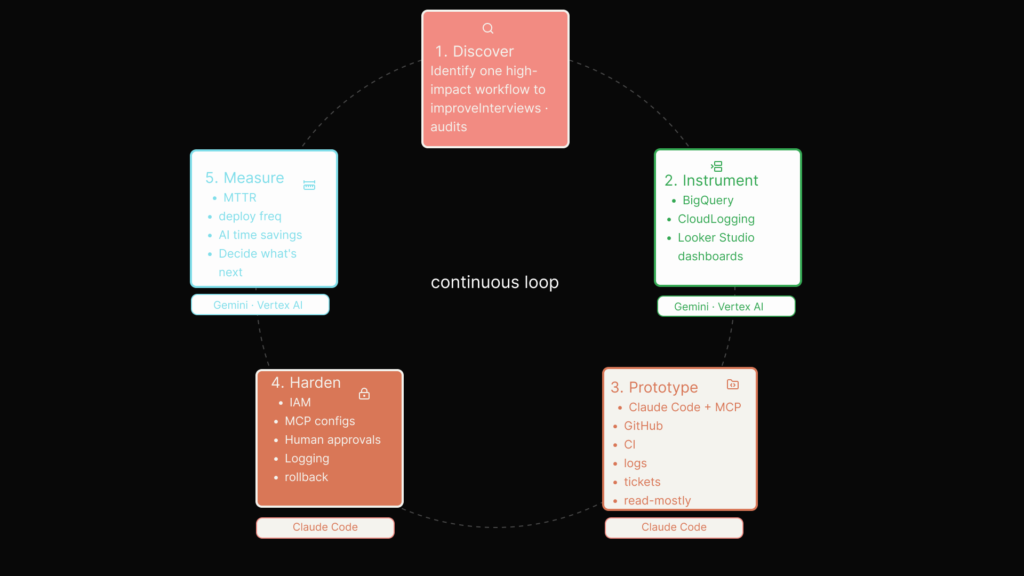
A continuous loop where small teams discover high‑impact workflows, instrument data on GCP, prototype Claude agents, harden permissions and measure impact.
For developers
Developers should stop evaluating coding tools as if they were interchangeable chat surfaces. Test them against the real work: debugging across logs and code, moving from issue to implementation to pull request, using external data safely, handling long-running tasks, and recovering when context gets messy.
For product managers
Product managers need to be blunter about governance. If the assistant can define which tools are visible, what counts as relevant context and where human intervention happens, then the interface is making governance decisions whether the roadmap admits it or not. Build review paths and override mechanisms early. Treat tool exposure as a product decision, not just an engineering convenience.
For designers
Designers should resist the temptation to make autonomous systems feel smoother than they are. Legibility is not a nice-to-have. Status, blocked states, permission prompts, recent actions and the ability to inspect or interrupt the agent are core trust features, not clutter.
For teams adopting Claude Code now
Teams adopting Claude Code with MCP should keep a few rules in view. Keep the shared tool layer small. Pin scopes tightly. Review project-scoped MCP configs like code. Use agent view for bounded tasks, not theatre. Treat server descriptions as part of the model interface. Never confuse background execution with responsible supervision.
Copilot remains the easier mass adoption layer. Cursor remains the more natural home for editor-centric power users. Yet Anthropic is furthest along in treating coding assistance as a problem of orchestration, permissions and context economics. That is why MCP and agent view matter more than another benchmark chart.
What Anthropic has understood, more clearly than most rivals, is that the next platform battle will not be won by the assistant that sounds smartest in a screenshot. It will be won by the assistant that best manages the trade-offs between capability, control and cognitive overhead when the work gets real.
What disappears, if teams are careless, is not effort. It is authorship.
‘The danger is not that machines start coding like humans. It is that humans start accepting workflows they no longer remember choosing.’
Footnotes
- Anthropic, ‘Agent view in Claude Code’, 11 May 2026.
- Anthropic, ‘Connect Claude Code to tools via MCP’. Documentation page accessed via Anthropic docs.
- Anthropic, ‘Introducing the Model Context Protocol’, 25 November 2024.salesforce
- TrueFoundry, ‘Cursor vs GitHub Copilot: Which AI Coding Tool Should You Choose?’, 20 March 2026.truefoundry
- Yuv.ai, ‘Best AI Coding Assistants 2026: Cursor vs Copilot vs Claude Code’.yuv
- Groovyweb, ‘Cursor vs Copilot vs Claude Code (2026)’, 7 May 2026.groovyweb
- 24 AI, ‘Claude Code v2.1.139: Agent View and /goal command’, 11 May 2026.24-ai
- LinkedIn post reported by Analytics India Magazine, ‘Anthropic Enhances Claude Code with MCP Tool Search’, 14 January 2026.linkedin
- MintMCP, ‘Claude Code vs Cursor vs Copilot: 2026 Security Analysis’, 19 March 2026.mintmcp
- LinkedIn post by Ethan Yuanming Hu, ‘Boosting Claude Code Productivity with 10 Essential Tricks’, 22 February 2026.linkedin
- LinkedIn post summary, ‘Developers’ Use of Claude Code Raises Security Concerns’, 5 March 2026.linkedin
- Anthropic, ‘Claude Code by Anthropic’, product page accessed 2026.claude
- Anthropic, ‘How Emergent is making app building more accessible with Claude’, 13 May 2026.reddit
- Anthropic, ‘How Claude Code Works’, YouTube video.tokyodev