
The costly mistake is not choosing the wrong AI design tool. It is using five tools for the same job.
That is where many teams are heading. One tool makes UI from a prompt. Another turns code into a design. A third creates wireframes from a sitemap. Another builds campaign assets. Yet another checks visual attention. Each one may be useful. However, they do not solve the same problem.
“Make design faster” is too vague. Faster at what? First ideas? Wireframes? Product UI? Brand assets? Code handoff? Design-system checks? User testing? Content consistency?
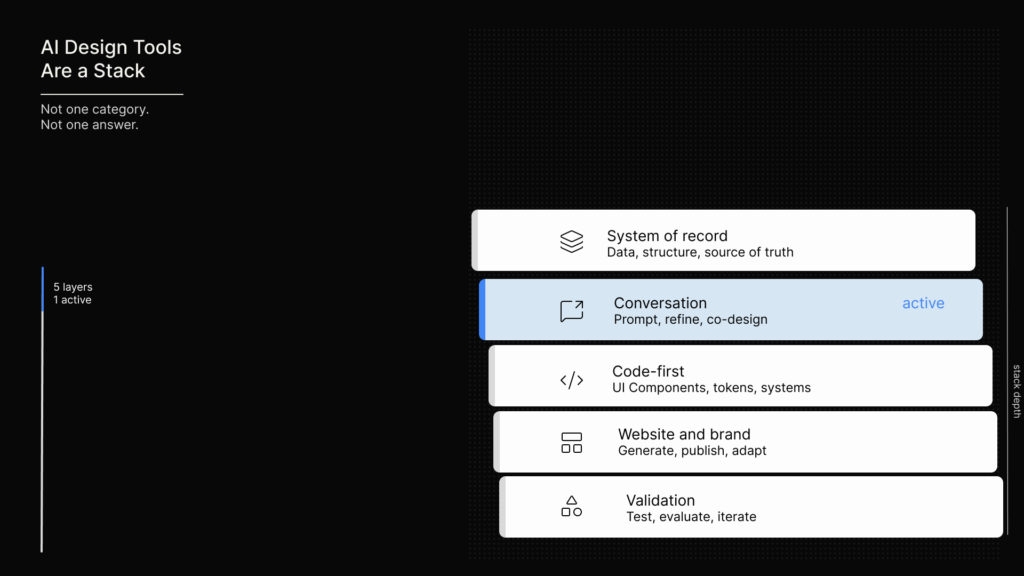
AI-powered design systems are not one category. They are a stack.
Some tools help you imagine. Others help you organise. A few help you ship. Meanwhile, some tools help you keep brand and UI work from drifting.
The smarter move is to choose by workflow stage, not by hype.
Use AI where exploration is expensive, rules are clear, or handoff is painful.
Avoid it where the tool gives you polish without structure.
The trend signal: polished AI is already getting boring
Before choosing tools, look at the visual culture they must serve. Behance, Dribbble, Muzli and Pinterest show different kinds of signals.
What creators are testing
Behance shows what creators are testing. Its 2026 trend signals include node-based AI workflows, retro and brutalist imperfection, immersive 3D, humanised letterforms, bold colour, cinematic motion, anti-polish and raw authenticity (Behance).
The new creative value often appears in the human mark: rough texture, visible grids, irregular type, candid images and controlled friction.
This matters because AI tools are very good at smoothness. As a result, the new creative value often appears in the human mark: rough texture, visible grids, irregular type, candid images and controlled friction.
What polished work is proving
Dribbble shows polished agency and product work. Its curated 2026 examples point to clear hierarchy, structured layouts, sharp type, restrained colour, modular cards, guided flows, subtle motion, dynamic brand systems and 3D storytelling (Dribbble).
Trend is not enough. The best work turns complexity into something readable.
In other words, trend is not enough. The best work turns complexity into something readable. Therefore, AI output needs more than visual style. It needs order, rhythm and intent.
What the web is becoming
Muzli tracks the web-design mood. It argues that AI has moved into visuals, motion, layout and code. It also points to retro design, responsive 3D, WebGL, micro-animations, kinetic type, sound, multimodal interfaces and “Machine Experience” as 2026 web-design shifts (Muzli).
However, Muzli’s Figma systems guide is more grounded. It says production-ready systems now need Variables, Auto Layout, component properties, framework parity and Figma-to-code alignment, especially with Tailwind, shadcn/ui, Chakra and Ant Design-style systems (Muzli).
What consumers are signaling
Pinterest adds the consumer layer. Its 2026 Predicts report frames the year around emotional comfort, personal curation and grounded optimism. It names trends such as Gimme Gummy, FunHaus, Neo Deco, Glitchy Glam, Vamp Romantic, Cool Blue, Extra Celestial and Mystic Outlands (Pinterest Newsroom).
For designers and content strategists, the lesson is simple. People want identity, comfort, escapism, tactility and nostalgia, not just cleaner screens.
So the better question is not “Which AI tool makes the nicest UI?” Instead, ask which tool lets you explore culture without breaking the system underneath.
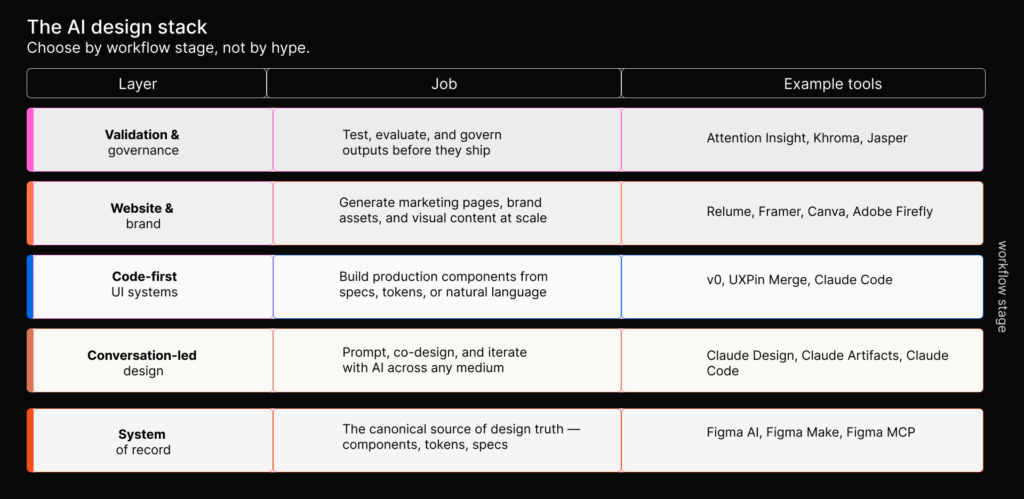
The AI design stack
AI design work now has five useful layers.
| Layer | What it solves | Typical tools |
|---|---|---|
| System-of-record design | Keeps work tied to components, variables, comments and review | Figma AI, Figma Make, Figma MCP |
| Conversation-led design | Turns rough ideas, files, prompts or code context into prototypes | Claude Design, Claude Artifacts, Claude Code |
| Code-first UI systems | Builds from component libraries, registries, Tailwind or production code | v0, UXPin Merge, Claude Code |
| Website and marketing systems | Creates sitemaps, wireframes, landing pages and campaign assets | Relume, Framer, Canva, Adobe Firefly |
| Validation and governance | Checks attention, color, copy, brand voice or consistency | Attention Insight, Khroma, Jasper |
This distinction saves money. For example, a tool that is great for first ideas may be poor for production. A tool that is great for code-aligned UI may be too heavy for a campaign page. Likewise, a tool that scales brand assets may not understand product states.
The cheapest workflow is not the one with the cheapest subscription. It is the one with the least rework.
Trend-to-tool map
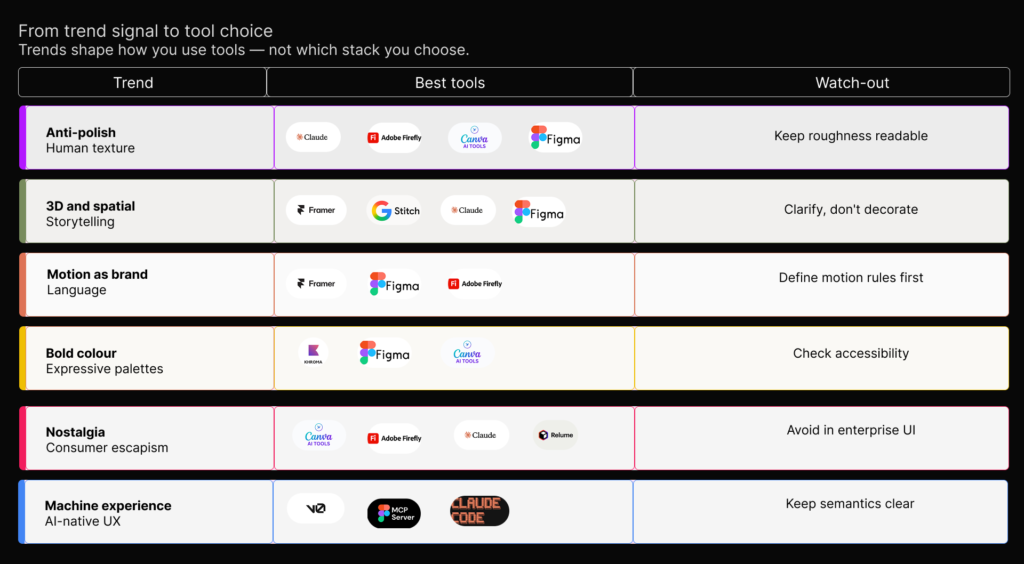
Trends should not decide your stack. However, they should shape how you use it.
| Trend signal | What it means | Best tools to explore it | Watch out for |
|---|---|---|---|
| Anti-polish and human texture | Raw edges, rough grids, hand-drawn details and imperfect type are a reaction to smooth AI output. | Claude Design, Adobe Firefly, Canva, Figma | “Raw” should not become careless. Keep contrast, spacing and reading clear. |
| 3D and spatial storytelling | 3D is becoming an explanation layer, not just decoration. | Framer, Stitch, Claude Artifacts, Figma | Use 3D only when it clarifies the idea. Performance still matters. |
| Motion as brand language | Microinteractions, kinetic type and dynamic logos are part of identity. | Framer, Figma, Adobe Firefly, Claude Artifacts | Define motion rules. Otherwise, every animation becomes a one-off. |
| Bold colour and expressive palettes | Cool blues, glitch effects, neo-deco and high-saturation palettes show a taste for emotion. | Khroma, Figma Variables, Canva Brand Kit, Adobe Firefly | Check accessibility. A palette is not a system until it has rules. |
| Consumer nostalgia and escapism | Pinterest’s comfort and nostalgia signals point to emotional design. | Canva, Firefly, Claude Design, Relume | Good for campaigns. However, it can weaken enterprise UI if it harms trust. |
| Machine Experience | Sites must be readable by people and AI agents. | v0, Figma MCP, Claude Code, Relume, Framer | Do not design only for screenshots. Keep hierarchy and semantics clear. |
A palette is not a system until it has rules.
Do not design only for screenshots. Keep hierarchy and semantics clear.
The practical tool guide
Figma AI and Figma Make
Choose Figma when your team already works in Figma and needs AI inside the shared design system. Figma describes Make as prompt-to-code generation with design-system integration that can pull from existing buttons, cards, layouts and tokens (Figma).
This is useful when a generated idea must survive team review. It can stay close to components, variables, comments and handoff.
However, do not use Figma AI to hide a messy system. If your components are inconsistent, AI will inherit that mess. Start with one real flow and a clean component subset. Then test whether AI chooses the right parts before scaling.
Claude Design
Claude Design works best when the problem is still forming. It is strong for first passes, concept directions, prototypes, decks, one-pagers and marketing ideas. Anthropic says Claude Design can create designs, prototypes, slides, one-pagers and marketing collateral, and can build design systems by reading codebases and design files (Anthropic).
Because it starts from conversation, Claude is useful when you need to think visually before the brief is fully settled. PMs can sketch feature flows. Marketers can test campaign ideas. Founders can make pitch concepts. Similarly, designers can explore several directions before choosing one.
Even so, do not treat the output as production-ready by default. A polished result still needs design-system review, accessibility checks, copy review and engineering judgment. Use Claude to think faster, not to skip judgment.
Claude Artifacts and Claude Code
Claude Artifacts and Claude Code are useful when design thinking needs to become interactive. Anthropic says Artifacts can create websites, dashboards, architecture diagrams, interactive prototypes, documents, code, flowcharts and SVG graphics (Anthropic).
This helps when you need to test logic, hierarchy and feasibility. It is also helpful when the question is “Could this work?” rather than “Is this our final UI?”
Still, do not confuse a working prototype with a maintained product pattern. Stop once the prototype has answered the question. Otherwise, you pay for extra iteration that does not improve the decision.
A working prototype is not a maintained product pattern.
v0
v0 is strongest when your design system is code-first. It works well for React, Tailwind, shadcn/ui and custom registries. v0’s docs say registries can pass components, blocks and design tokens to AI models so prototypes match a custom system (v0).
This is a real shift. Instead of asking AI to invent UI from taste alone, you give it your actual building blocks.
However, v0 is not the best place for rich brand exploration if there is no component system behind it. It works best when the rules are explicit. Therefore, spend time on a clean registry or Tailwind setup before generating many screens.
The setup is the saving.
UXPin Merge
UXPin Merge is worth considering when code components are the design components. UXPin says Merge lets designers use the same components as developers and render interactive UI libraries from production code (UXPin).
This suits enterprise teams, internal products and systems where design-dev drift is costly. By contrast, it is less useful for early visual exploration or one-off campaign work.
If you only need quick mockups, skip it. Choose UXPin Merge when fidelity, governance and production consistency matter more than speed.
Relume
Relume is useful when website structure is the bottleneck. Its workflow moves from prompt to sitemap, then wireframe, then style guide, then export to Figma, Webflow or React (Relume).
This helps because many website projects fail before visual design. Teams often skip sitemap logic, page hierarchy and messaging structure. Relume makes those choices visible early.
However, it is not a full product-design system. Use it for marketing sites, agency work, client approvals and web architecture.
Framer
Framer makes the most sense when the outcome is a live site. Framer says its AI tools can generate layouts, create interactive components, translate sites and support AI plugins for images, text rewriting and alt text (Framer).
That makes it useful for portfolios, startup sites, landing pages and campaign pages. The economic case is strongest when the same tool helps you design, refine and publish.
If the design will be rebuilt elsewhere, be careful. Framer then becomes another handoff rather than a saving.
Google Stitch
Google Stitch is useful for early UI exploration and design-to-code experiments. Google describes Stitch as an AI-native software design canvas that turns natural language into high-fidelity UI and can use images, text and code as context (Google).
It is helpful for “show me three directions” work. It can also help founders, designers and product teams move from idea to interface quickly.
However, do not make it your main source of truth until your team is comfortable with its maturity, export paths and governance. Experimental tools are best for exploration.
Uizard and UXPilot
Uizard is useful for quick wireframes, mockups and stakeholder conversations. Uizard says Autodesigner creates multi-screen editable prototypes from text prompts, while its scanners turn screenshots and hand-drawn wireframes into editable mockups (Uizard).
UXPilot is better for fast web-app ideation and AI-assisted UX/UI production. UXPilot describes itself as a tool to ideate, design and hand off web applications, with designs created in under a minute (UXPilot).
In both cases, avoid over-investing if your final system lives in Figma, code or another production tool. Use these tools to unblock thinking. Then move the best direction into the real workflow.
Canva and Adobe Firefly
Canva Magic Studio is strong for brand-consistent marketing output. Canva says Magic Design creates presentations, videos and social posts from text or uploaded media, while Magic Switch reformats designs for many platforms (Canva).
Adobe Firefly is better for campaign visuals, moodboards, image generation, creative variations and commercial creative workflows. According to Adobe, Firefly is a family of generative AI models for images, video, audio and vectors, integrated across Creative Cloud. Its first Firefly model was trained on licensed Adobe Stock and public-domain content (Adobe).
However, neither tool should become your product UI system. They are strong for brand output and creative production. They are not enough for interaction states, product logic or component governance.
Attention Insight, Khroma and Jasper
Treat these as guardrails, not full design tools.
Attention Insight predicts attention patterns and offers AI heatmaps, attention metrics and a Figma plugin (Attention Insight). Use it to compare landing page variants or defend visual hierarchy before deeper testing.
Khroma helps designers generate and save color combinations, with hexcodes, RGB values, CSS and WCAG ratings (Khroma). Use it for early palette work. Then lock a small usable system.
Jasper Brand Voice helps maintain brand voice and flags off-brand tone with suggested changes (Jasper). Use it for high-volume marketing content. Also pair it with UX-writing rules for product copy.
Do not confuse signals with proof. Heatmaps are not user research. Palettes are not brands. Tone checkers are not content strategies.
How to choose without overspending
Start with the workflow leak. That is the part of the process where time, quality or money disappears.
Match the tool to the leak
If the leak is “we cannot make vague ideas visible,” try Claude Design, Stitch, Uizard or UXPilot. If the leak is “our screens drift from the system,” look at Figma, v0 or UXPin Merge. When website planning takes too long, Relume or Framer may help. If brand output is inconsistent, Canva, Firefly or Jasper may be the better choice. Finally, if stakeholders argue by taste, Attention Insight can add one useful signal.
Most waste comes from mismatch. Teams buy an exploration tool and expect governance. They buy a code-first tool and expect art direction. They buy a brand asset tool and expect product design discipline.
Set rules before you subscribe
Use five rules before adding another AI design tool.
- Pick one source of truth. For product teams, that may be Figma, code components or a registry. For marketing teams, it may be a brand kit or template system.
- Test one exploration tool at a time. Claude Design, Stitch, Uizard and UXPilot overlap. Run one real brief before adding another.
- Move out of disposable outputs fast. If a generated screen cannot be edited, coded, approved or tested, treat it as inspiration.
- Write a reusable prompt brief. Include audience, goal, constraints, design system, content rules, accessibility needs and must-use components.
- Define a stop rule. Decide whether the tool must produce three directions, one wireframe, a test prototype, a launch asset or a design-system variant.
The cost problem with AI design is not just subscription cost. It is rework cost. A tool is expensive if it creates beautiful work that must be rebuilt. By contrast, a tool is cheap if it helps the team make a better decision faster.
Recommended stacks by team type
Solo consultant or creator
Keep it lean. Use Claude Design or Stitch for early exploration. Move durable design files into Figma. For marketing assets, use Canva or Firefly. If the project is a website and the sitemap is unclear, add Relume.
However, do not subscribe to overlapping ideation tools at the same time unless you are actively comparing them for paid work.
Product team
Start with the source of truth. If the system lives in Figma, test Figma AI and MCP workflows first. If the system lives in code, test v0, UXPin Merge or Claude Code.
Above all, do not buy more tools until the team decides which system leads.
AI should reduce translation loss, not create more versions of the truth.
Marketing team
Separate website structure from content production. Relume can help with sitemap and wireframe thinking. Framer works if the site will be published there. Canva supports repeatable brand assets. Firefly helps with richer visuals. Jasper can support voice control.
In practice, templates save more money than generations. A good template with AI-assisted variants beats endless one-off outputs.
Agency
Use AI where it shortens client alignment. Relume can make scope visible. Uizard can turn rough ideas into mockups. Attention Insight can support hierarchy decisions. Meanwhile, Figma can remain the review hub.
Do not sell the myth that AI made the work effortless. Instead, charge for judgment, curation and decision quality.
Enterprise team
Governance matters more than novelty. Figma, UXPin Merge, v0 registries, Claude Code and clear documentation may matter more than lightweight ideation tools.
Therefore, pilot AI on a contained workflow with review gates. Do not let every team adopt a different AI design tool and then spend a year reconciling outputs.
The spending traps
Too many variations
The first trap is variation addiction. AI makes it easy to generate ten options. However, that does not mean ten options are useful. Three strong directions usually beat twelve weak ones.
Too much overlap
The second trap is tool overlap. Claude Design, Stitch, Uizard and UXPilot can all help with early exploration. In most cases, you do not need all four.
Too much rebuilding
The third trap is rebuild waste. If a tool produces a beautiful mockup that cannot move into your real workflow, it is only a sketch.
Too little governance
The fourth trap is brand drift. Canva, Firefly and Jasper can speed up output, but they need brand kits, examples, templates and approval rules.
The fifth trap is governance theater. A heatmap, tone check or accessibility scan is a signal. It is not permission to ship.
The better question
Do not ask, “Which AI design system should we use?”
Instead, ask what kind of work needs help.
Are you exploring an idea? Enforcing a system? Generating code? Publishing a site? Scaling brand assets? Testing hierarchy? Reducing handoff pain?
Each answer points to a different tool.
Figma helps when the design file is the shared product record. Claude helps when the idea is still conversational.
v0 helps when the system is code-native. Relume helps when website structure is the bottleneck. Framer helps when design needs to become a live site. Canva and Firefly help when brand output needs scale. Attention Insight, Khroma and Jasper help when decisions need guardrails.
The best teams will not use one AI design tool for everything. Instead, they will build a small stack where each tool has a job and a stop point.
That is how you avoid paying twice: once for the AI tool, and again for the human rework it creates.
Footnotes
[^1]: Behance, “Design Trends 2026”: https://www.behance.net/gallery/239027109/Design-Trends-2026
[^2]: Dribbble, “The Ultimate 2026 Dribbble Select Best Shots of the Year”: https://dribbble.com/resources/agencies/ultimate-dribbble-select-best-shots
[^3]: Muzli, “Web Design Trends 2026”: https://muz.li/blog/web-design-trends-2026/
[^4]: Muzli, “Best Figma UI Kits and Design Systems for 2026”: https://muz.li/blog/best-figma-ui-kits-and-design-systems-for-2026/
[^5]: Pinterest Newsroom, “Pinterest Predicts: Nonconformity, self-preservation, and escapism drive 21 trends for 2026”: https://newsroom.pinterest.com/news/pinterest-predicts-nonconformity-self-preservation-and-escapism-drive-21-trends-for-2026/
[^6]: Figma, “Top AI Tools for UX Designers in 2026”: https://www.figma.com/resource-library/ai-tools-for-ux-designers/
[^7]: Anthropic, “Introducing Claude Design by Anthropic Labs”: https://www.anthropic.com/news/claude-design-anthropic-labs
[^8]: Anthropic, “Artifacts are now generally available”: https://www.anthropic.com/news/artifacts
[^9]: v0 Docs, “Design systems”: https://v0.app/docs/design-systems
[^10]: UXPin, “Merge”: https://www.uxpin.com/merge
[^11]: Relume, “Websites designed and built faster with AI”: https://www.relume.io
[^12]: Framer, “Design websites faster with intelligent tools”: https://www.framer.com/ai/
[^13]: Google, “Introducing vibe design with Stitch”: https://blog.google/innovation-and-ai/models-and-research/google-labs/stitch-ai-ui-design/
[^14]: Uizard, “UI Design Made Easy, Powered By AI”: https://uizard.io
[^15]: UXPilot, “Superfast UX/UI Design with AI”: https://uxpilot.ai
[^16]: Canva, “Meet Magic Studio”: https://www.canva.com/magic/
[^17]: Adobe, “Adobe Firefly”: https://www.adobe.com/products/firefly.html
[^18]: Attention Insight, “AI-Driven Pre-Launch Analytics”: https://attentioninsight.com
[^19]: Khroma, “AI Color Tool for Designers”: https://www.khroma.co
[^20]: Jasper, “AI-powered brand voice management”: https://www.jasper.ai/brand-voice