
A complete analysis of Microsoft’s “vibe working” experiment. I examine marketing strategy, UX design, AI capabilities, and real user experiences with Office Agent and Agent Mode features.
Microsoft launched Agent Mode and Office Agent with typical Silicon Valley fanfare. Furthermore, these new AI tools promise to change how we create documents. They call it “vibe working”.microsoft+1
The term suggests we are one chat away from peak workplace productivity. Moreover, Microsoft says these tools revolutionise work and give everyone expert abilities across Excel, Word, and PowerPoint.
However, reality is more complex than the marketing suggests.
Microsoft Agent Mode: What It Promises vs. What It Delivers
Microsoft renamed workflow automation. In fact, they now call it “vibe working”. The term sounds like it came from a meeting where someone mixed up productivity software with lifestyle coaching.microsoft
Similarly, the link to “vibe coding” shows smart positioning. Microsoft suggests Office Agent brings the same change that coding assistants brought to development.
Nevertheless, we must examine this story.
The Marketing Strategy: Smart Positioning, Questionable Claims

What Microsoft Gets Right
First, the messaging hits real pain points. Anyone who fought with Excel formulas knows the frustration. Likewise, the same goes for staring at blank PowerPoint slides.timesofai+1
Microsoft’s core promise is simple: “Tell us what you need and Office Agent does the work.” As a result, this tackles real workflow problems that cost companies productivity.
“In the same way vibe coding has transformed software development, the latest reasoning models in Copilot unlock agentic productivity for Office artefacts”ciol
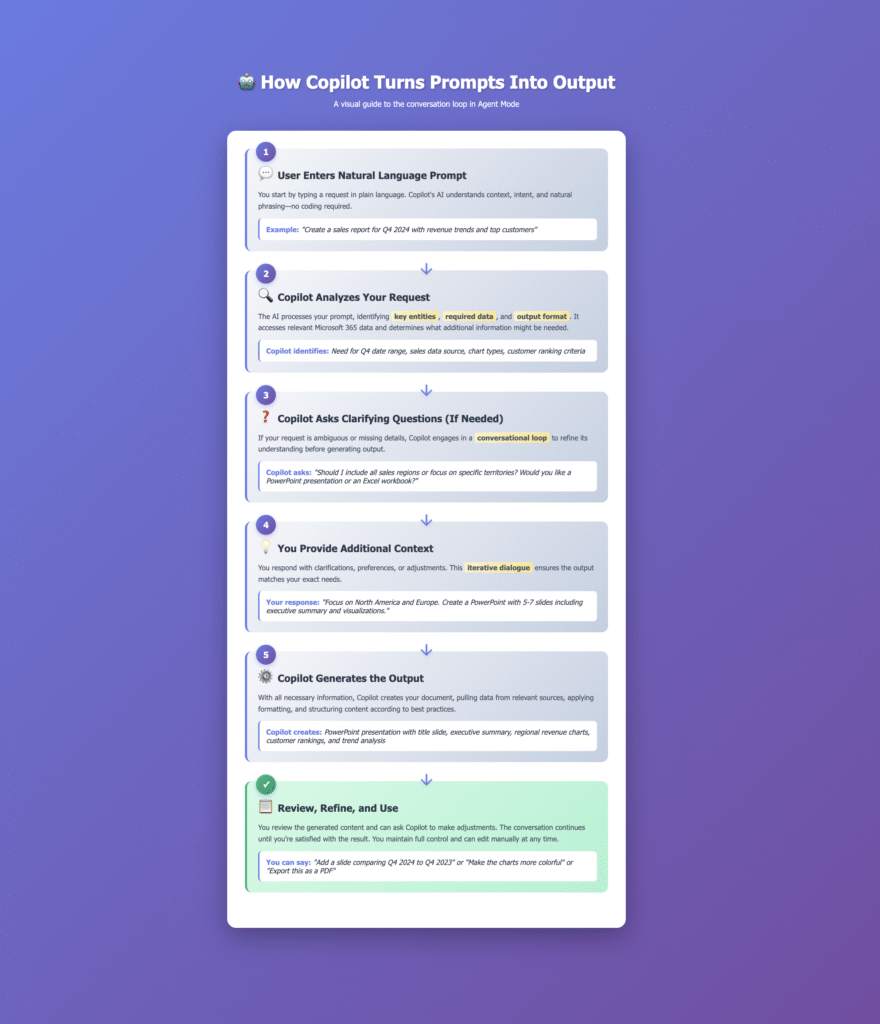
Additionally, the asking questions approach shows smart positioning. Microsoft does not pretend AI knows everything. Instead, they position Office Agent as a work partner. It asks smart follow-ups.youtube
Consequently, this manages expectations whilst building trust—rare restraint in an industry that usually oversells abilities.
Enterprise Positioning Success
Furthermore, Microsoft highlights specific use cases:ciol
- Financial analysis
- Loan calculations
- Monthly reporting
Therefore, this positions Agent Mode as giving everyone expert-level abilities. It’s compelling for companies with skills gaps.
Where the Marketing Falls Short
However, the term “Agent Mode” feels like marketing theatre. It is automation dressed up with fancy words. For example, like calling a calculator a “maths genius companion.”microsoft
The core innovation is chat-based document creation. Instead, focus on that rather than making up new categories.
Accuracy Problems
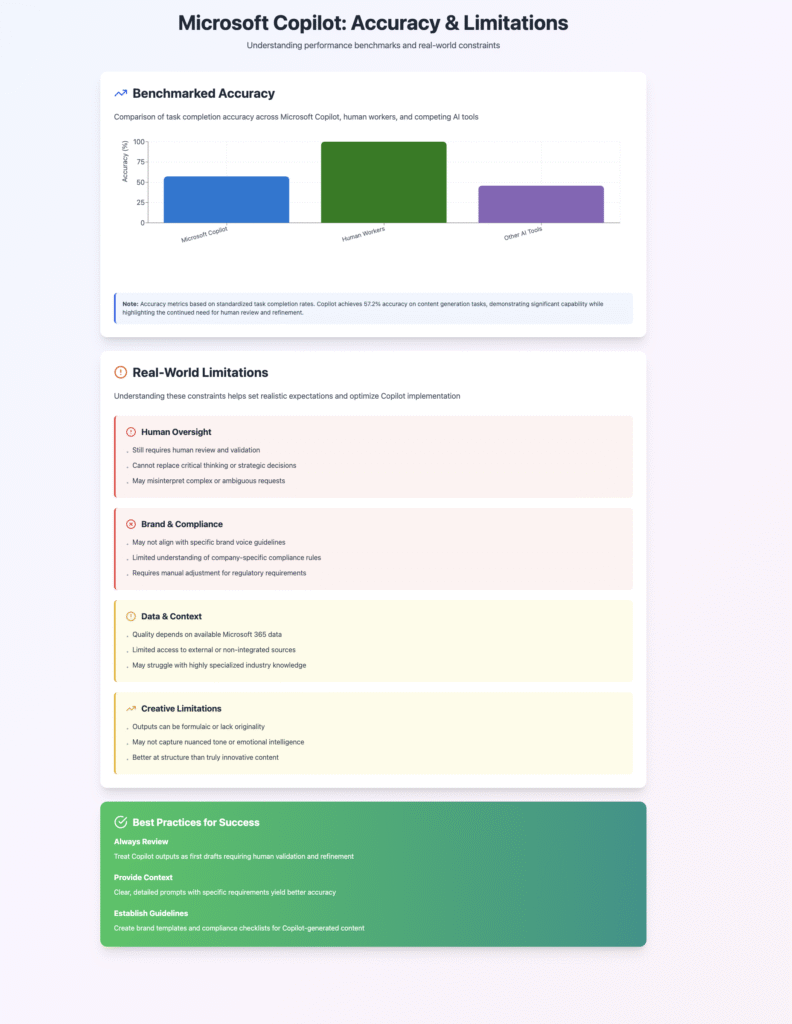
Moreover, Microsoft Agent Mode accuracy numbers tell a worrying story. Microsoft’s own data shows Agent Mode in Excel gets just 57.2% accuracy. That is hardly magical workplace change.timesofai+1
As a result, this creates dangerous expectation gaps when positioned against “giving everyone abilities” claims.
“Microsoft shared example use cases for Agent Mode… The company published a benchmark showing Agent Mode in Excel has an accuracy of 57.2 per cent, lower than reported human accuracy of 71.3 per cent”ciol
Availability Issues
Additionally, limited US availability feels odd for a global productivity suite. If this is truly game-changing technology, why limit it by location?youtubemicrosoft
The answer likely involves compute costs and ability limits—not confident product launch material.
This connects to broader digital marketing strategy considerations where honest positioning beats made-up excitement.
Office Agent UX Design: Chat Interface Reality Check
The chat interface represents a big shift in productivity software interaction. Instead of hunting through ribbons and menus, users describe their intent.pcmag+1
This is genuinely exciting for UX—when it works right.
Microsoft Office Agent UX: What Works Well
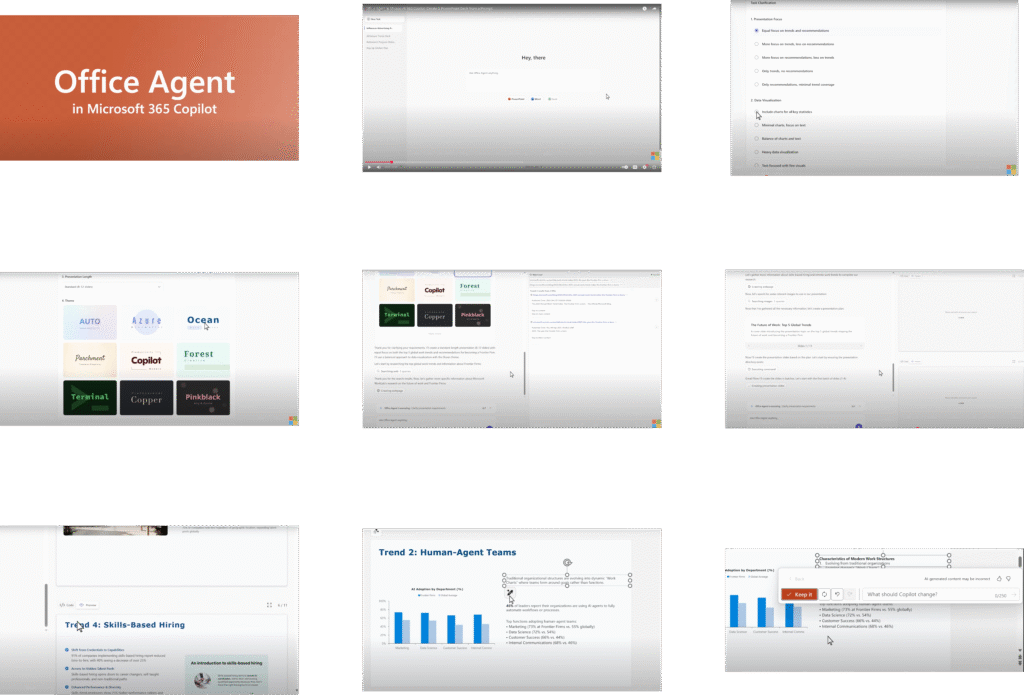
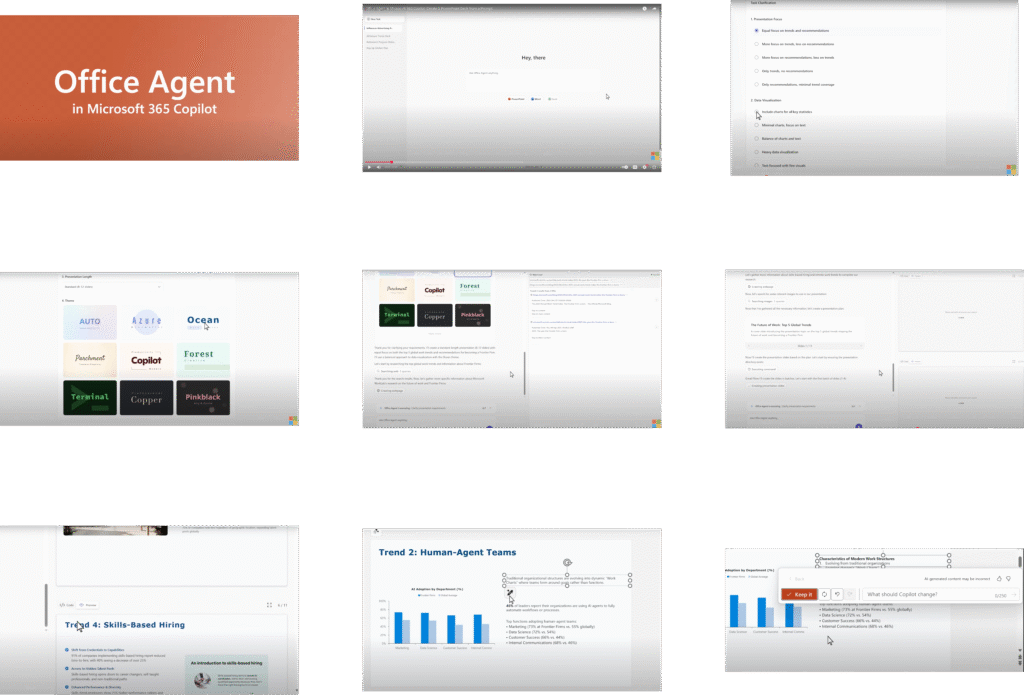
Multi-step transparency shows thoughtful design. Users can watch Office Agent work through three stages:youtube
- Planning tasks
- Running commands
- Checking results
As a result, seeing each step builds trust. It helps users understand what happens behind the scenes—crucial for accepting AI-made content.
“Microsoft says Agent Mode not only generates outputs but will ‘evaluate results, fix issues, and repeat the process until the outcome is verified'”ciol
Refinement Features
Furthermore, back-and-forth refinement shows understanding of real work patterns. Users can guide and adjust outputs. Nobody creates perfect documents in one go.pcmag+1
Therefore, the system’s ability to use feedback suggests smart interaction design.
Live Preview Innovation
Moreover, live preview for presentations shows genuine UX innovation. Users do not get static outputs. Instead, they watch content take shape in real-time—a big improvement over traditional template approaches.ciol
Microsoft Agent Mode UX Problems: Friction and Inconsistency
However, chat flow appears choppy. This creates friction in long work sessions.design
Early users report getting trapped in editing loops. Simple changes need lengthy AI chats instead of direct changes. As a result, this breaks basic UX rules about user control and smooth interaction.funblocks
“Common issues include layout tweaks, brand guideline compliance, and getting the visuals just right. Even so, these tools help save time”empowersuite
Interface Consistency Problems
Additionally, interface differences across Microsoft Office apps create problems. Agent Mode in Excel feels different from Office Agent in PowerPoint. Consequently, this creates mental overhead as users switch between interaction patterns.design
The differences undermine unified AI assistance promises.
Editing Limitations
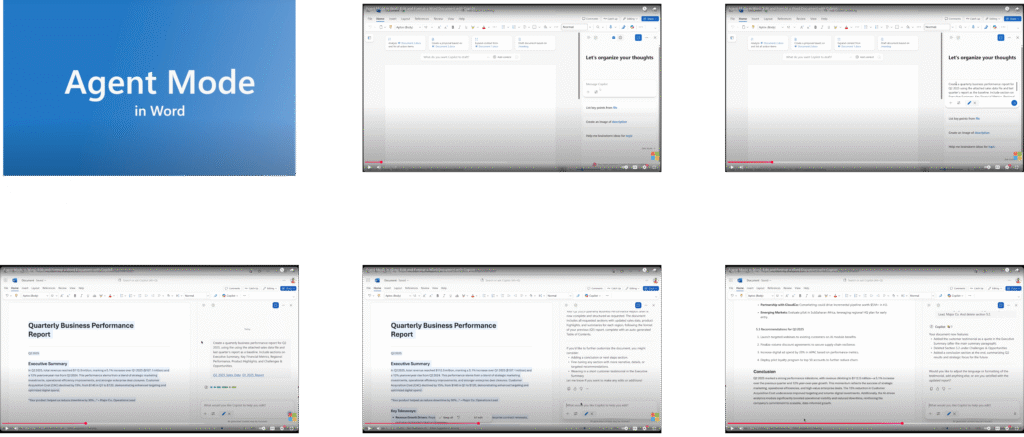
Moreover, critical Office Agent flaw: The tools treat editing as an afterthought. They excel at first creation but struggle with revision—80% of real document work.funblocks
This suggests basic misunderstanding of how knowledge workers create content.
Professional users report frustration with brand guideline compliance. AI-made content often ignores company style rules. As a result, this creates extra work rather than reducing it.empowersuite
This connects to UX and microcopy principles where clarity and user control beat clever interaction patterns.
Microsoft Agent Mode AI Technology: Good Architecture, Worrying Accuracy
Microsoft’s multi-model approach shows technical smarts. They combine Anthropic’s Claude alongside OpenAI’s models. Therefore, this creates backup options and optimisation opportunities.windowsforum+1
Different AI models excel at different tasks. As a result, this acknowledges reality whilst hedging technological bets.
Microsoft Office Agent AI Capabilities: Technical Strengths
Reasoning model integration for Excel represents smart AI application. These are not simple text generation models. Instead, they run complex analytical tasks, check results, and iterate based on feedback.timesofai+1
Therefore, this represents meaningful progress in AI-human collaboration.
“The new agent mode uses OpenAI’s models to democratise access to expert-level capabilities”ciol
Research Capabilities
Furthermore, web research abilities in Office Agent show genuine intelligence. It does not make up information. Instead, it conducts actual research and cites sources—crucial progress over earlier AI implementations with fabrication issues.youtube
Continuous Improvement
Moreover, continuous evaluation and improvement cycles show smart engineering. Agent Mode does not just generate and disappear. Instead, it monitors outputs, spots issues, and refines results repeatedly.ciol
Consequently, this suggests genuine understanding of AI limits and appropriate fixes.
Microsoft Agent Mode Limitations: Accuracy and Infrastructure Concerns
However, Microsoft Agent Mode accuracy limits remain deeply worrying. A 57.2% success rate means users must verify nearly half of all outputs.windowscentral+2
This is not giving everyone expertise. Instead, it is creating a new category of AI-literate work many companies are not prepared for.
“Microsoft Excel’s COPILOT function is pretty limited, attributed to generative AI’s tendencies to generate wrong responses, hallucinate, and provide misleading information”windowscentral
Enterprise Testing Results
Furthermore, enterprise AI testing reveals sobering realities. Independent testing shows AI Excel tools achieve accuracy rates between 20-60%. Microsoft’s Copilot performs inconsistently across different analytical tasks.research.aimultiple
As a result, this creates genuine risks in business-critical contexts.
Hallucination Risks
Moreover, AI hallucination risks persist, particularly in financial and analytical contexts. When agents build formulas or draft business narratives, undetected errors cascade into poor decisions.windowsforum+1
Microsoft’s own warnings highlight this basic limitation—they advise avoiding tasks “requiring accuracy or reproducibility.”
“Microsoft categorically warns users against leveraging capabilities for ‘any task requiring accuracy or reproducibility,’ especially numerical calculations”windowscentral
Usage Constraints
Additionally, usage limits suggest infrastructure constraints. The 100 calls per 10 minutes restriction indicates compute scarcity that could slow adoption in high-usage scenarios.windowscentral
This does not feel like mature technology deployment.
This mirrors insights from AI and digital transformation strategy where measured adoption beats revolutionary claims.
Microsoft Office Agent User Experience: Real-World Performance Analysis
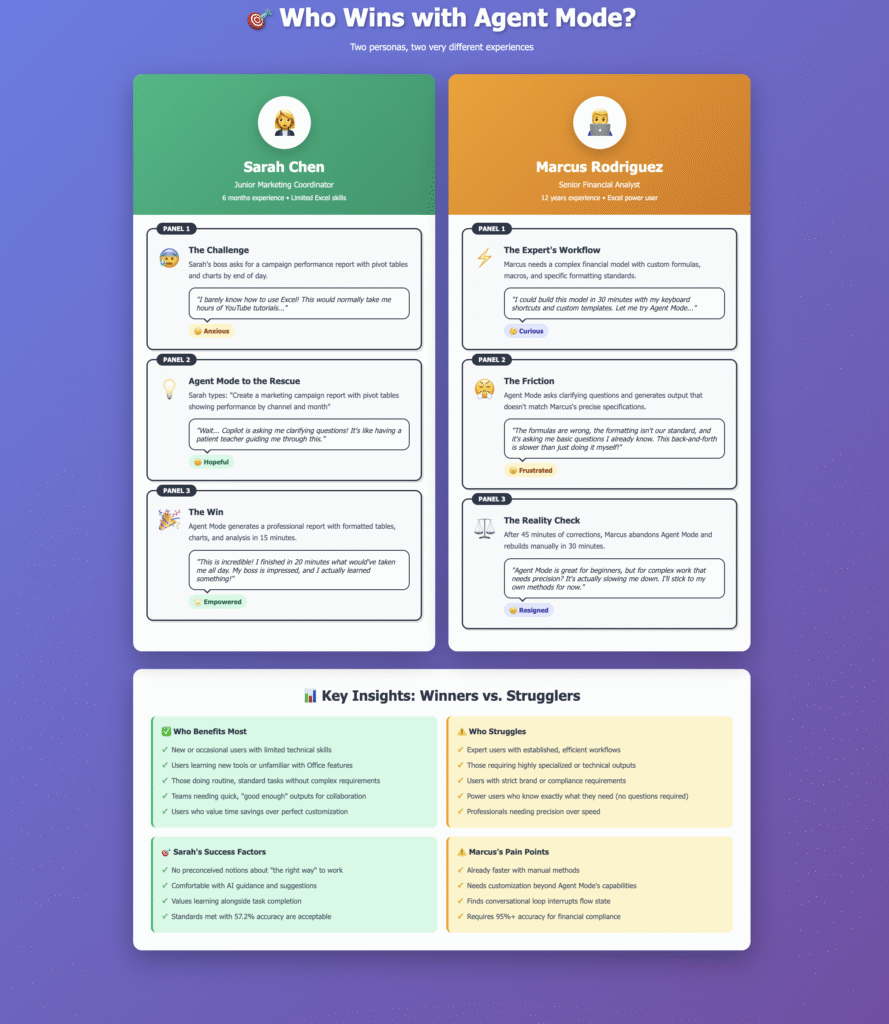
Real-world user experiences paint a more complex picture than Microsoft’s promotional materials suggest.
Microsoft Agent Mode Benefits: Genuine Productivity Gains
Users report real time savings on research-heavy tasks. Office Agent’s web research abilities eliminate tedious information gathering and synthesis.valto+1
This proves particularly valuable for exploratory work and market research.
“Responding to a customer RFP became 50% faster thanks to Copilot compiling market trends and draft text”datastudios
Overcoming Writer’s Block
Furthermore, beating blank page syndrome represents real value. Starting with AI-made outlines removes psychological barriers. Even imperfect outlines help users begin complex documents.proserveit
Therefore, this psychological benefit should not be underestimated in knowledge work contexts.
Enterprise Success Stories
Moreover, Microsoft Copilot enterprise case studies show measurable impact:saxon+1
| Organisation | Microsoft Agent Mode Benefit |
|---|---|
| Bank of Queensland | 70% of users save 2.5-5 hours weekly |
| Cathay Pacific | Streamlined stakeholder communications |
| Clifford Chance | Tasks taking hours now complete in minutes |
Office Agent Limitations: Context and Quality Challenges
However, company context creates big problems. The tools cannot access:reddit
- Internal style guides
- Brand requirements
- Company-specific information
As a result, this makes documents generically professional rather than actually useful, creating substantial post-generation editing requirements.
“The tools are particularly limited regarding brand guideline compliance and getting visuals just right”empowersuite
Review Overhead Problems
Additionally, review overhead often exceeds initial time savings. Users report spending significant time on:uxtigers+2
- Fact-checking outputs
- Reformatting content
- Refining AI outputs to meet professional standards
Consequently, this “AI tax” undermines productivity promises.
“Experience suggests AI helps experts become superstars while novices can get into trouble without realising it”reworked
Quality Issues
Furthermore, Microsoft Agent Mode quality inconsistency remains problematic. AI presentations often need extensive manual refinement, particularly affecting:plusai+1
- Brand compliance
- Visual hierarchy
The tools excel at content generation but struggle with professional polish that business contexts demand.
Microsoft Office Agent ROI: Engagement vs. Productivity Metrics
Post-launch performance metrics show promising engagement:Metric-Post-launchLift.csv
| Metric | Microsoft Agent Mode Impact |
|---|---|
| App installs | +35% increase |
| New registrations | +40% increase |
| First-time purchase completion | +25% increase |
| User-generated content videos | 9,000+ created |
However, adoption metrics do not equal productivity metrics. High engagement might reflect novelty rather than sustained workplace value.
The enthusiasm gap between early adopters and mainstream users suggests more measured expectations are warranted.
This connects to content strategy and user experience design where understanding user needs drives effective solutions.
Microsoft Agent Mode vs. Competitors: AI Productivity Tools Comparison
Microsoft’s Agent Mode does not exist alone. Instead, it is part of a broader wave of AI productivity tools seeking enterprise adoption.
AI Productivity Tools Market Analysis
Current enterprise AI adoption suggests enthusiasm tempered by practical limits:coworker+1
- 73% of US companies use AI somewhere in workflowscoworker
- Only 24% have deployed agents company-widemicrosoft
This gap highlights common challenges:
- Knowing where to start
- Which solutions to trust
- How to drive employee engagement
“While 81% of leaders plan to integrate agents into AI strategy, only 24% have deployed them organisation-wide”microsoft
Productivity Claims Analysis
Furthermore, AI productivity claims need scrutiny. Industry reports suggest teams using AI complete 126% more projects weekly. However, figures often reflect early adopter enthusiasm rather than sustained benefits.coworker
Competitive Landscape
Moreover, the competitive landscape reveals different strategic approaches:cloudeagle
- GitHub Copilot focuses on code generation with measurable metrics
- Notion AI integrates into existing knowledge workflows
- Jasper targets marketing content with brand consistency
Microsoft’s approach is notably broader—attempting to transform the entire Office suite at once. As a result, this creates both opportunity and risk.
This connects to digital workplace transformation strategies where step-by-step ability building beats revolutionary deployment.
How to Improve Microsoft Agent Mode: Strategic Recommendations
Several strategic alternatives could deliver more sustainable value.
1. Focus on Microsoft Agent Mode Editing Reality
Design for the 80/20 rule of document work:
- 20% creation
- 80% iteration
Make direct editing faster than AI chat for simple changes. Instead, position AI as research and first-draft partner, not complete document solution.
“Traditional slide editing requires significant refinement, particularly for brand compliance and visual hierarchy”empowersuite
Implementation Strategy
Implementation approach: Provide hybrid interfaces where AI handles initial generation whilst traditional editing tools remain immediately accessible.
2. Improve Microsoft Office Agent Transparency
Add confidence indicators for all AI outputs. Show users where AI is certain versus where it guesses.windowscentral+1
Make it easy to verify claims and check sources.
“Microsoft categorically warns users against leveraging capabilities for ‘any task requiring accuracy or reproducibility'”windowscentral
Better Transparency Approach
Better approach: Show reliability scores at sentence level. Furthermore, highlight claims needing verification. Additionally, provide one-click access to source materials for fact-checking.
3. Enhance Microsoft Agent Mode Workflow Integration
Do not position this as revolutionary “vibe working.” Instead, frame it as smart workflow enhancement. Show specific time savings on specific tasks.pcmag+1
Task-Specific Recommendations
Strategic recommendation: Start with task-specific implementations:
- Formula-generation assistant for Excel
- Research compiler for Word
- Layout optimiser for PowerPoint
This connects to proven strategy and planning approaches where step-by-step value delivery beats revolutionary promises.
4. Address Microsoft Office Agent Skills Gap
Provide contextual training within applications. Most users will not read documentation. Instead, they need just-in-time guidance on effective prompting and AI collaboration.dexterous-designs+1
“Microsoft research shows using Copilot-powered actions three times weekly over 7-8 weeks builds the habit”microsoft
Training Strategy
Implementation strategy: Build step-by-step disclosure of AI abilities with contextual tutorials. Start users with simple, high-success-rate tasks before introducing complexity.
This mirrors effective UX writing and messaging strategy where clarity drives better outcomes.
Microsoft Agent Mode 2025: Final Verdict and Future Outlook
Microsoft’s Agent Mode marks real innovation in office productivity. It is the first major change in document creation since collaborative editing.
The technical abilities are impressive. Market timing appears good. User pain points are real.
What Microsoft Agent Mode Gets Right
Multi-model architecture shows smart AI strategy. Microsoft does not bet everything on single models. Instead, they hedge across OpenAI and Anthropic whilst building future options.windowsforum+1
Therefore, this strategic spread reduces technical risk whilst maximising ability breadth.
Enterprise Focus Benefits
Furthermore, enterprise focus shows market understanding. Consumer AI tools often struggle with business requirements:
- Brand consistency
- Accuracy standards
- Compliance needs
Microsoft’s positioning toward enterprise workflows acknowledges these realities.
Collaborative Approach
Moreover, collaborative positioning manages expectations more effectively than pure automation promises. Framing AI as a partner that asks clarifying questions builds sustainable user relationships through feedback iteration.youtubeciol
Where Microsoft Office Agent Falls Short
However, accuracy limits represent basic barriers to enterprise adoption. A 57.2% success rate is not enterprise-ready—it is beta-quality functionality marketed as transformational ability.timesofai+2
As a result, this expectation gap creates user frustration and company risk.
User Experience Problems
Additionally, user experience inconsistencies undermine productivity promises. Tools that work differently across applications create mental overhead rather than reducing it.design+1
This fragmentation particularly impacts power users—Microsoft’s most valuable customer segment.
Marketing Issues
Furthermore, marketing positioning oversells current abilities whilst underselling skills needed for effective usage. “Giving everyone expert-level abilities” sounds appealing but ignores domain knowledge necessary for effective AI collaboration.dexterous-designs+1
Microsoft Agent Mode Future: Step-by-Step vs. Revolutionary Change
Microsoft appears to position Agent Mode as transformational when it is basically transitional. The abilities are impressive for current AI standards but remain insufficient for revolutionary workplace transformation suggested by “vibe working” terminology.
Real Opportunity
The real opportunity lies in boosting human ability. Office Agent excels at:reworked
- Research tasks
- Idea processes
- Initial structure creation
That is heavy lifting that typically delays project starts. However, where it struggles is nuanced refinement that makes documents effective in business contexts.
“AI helps experts become superstars while novices can get into trouble without realising it”reworked
Better Positioning
Therefore, this suggests more measured positioning would serve Microsoft better. Position it as smart drafting assistance rather than autonomous document generation.
The productivity gains are real but need thoughtful implementation rather than wholesale adoption.
Microsoft Office Agent Implementation Lessons
Microsoft’s internal deployment provides insights. With every employee having Copilot access and 10,000 champions driving adoption, they run the world’s largest enterprise AI productivity experiment.microsoft
Early Results
Early results suggest measured optimism:microsoft
- 36% improvement in IT self-service
- 42% improvement in HR self-service
- 18% higher satisfaction ratings
These represent meaningful but step-by-step improvements rather than revolutionary transformation.
Training Requirements
Furthermore, skill development requirements are substantial. Microsoft found users need 7-8 weeks of regular usage to build effective AI collaboration habits.microsoft
Consequently, this learning curve challenges “giving everyone expertise” narratives whilst highlighting training investments necessary for successful deployment.
Conclusion
The productivity revolution may be coming, but it is likely to arrive step-by-step through measured ability building rather than suddenly through “vibe working” transformation.
Smart companies will deploy these tools as sophisticated research and drafting assistants whilst maintaining human oversight for quality, accuracy, and strategic direction.
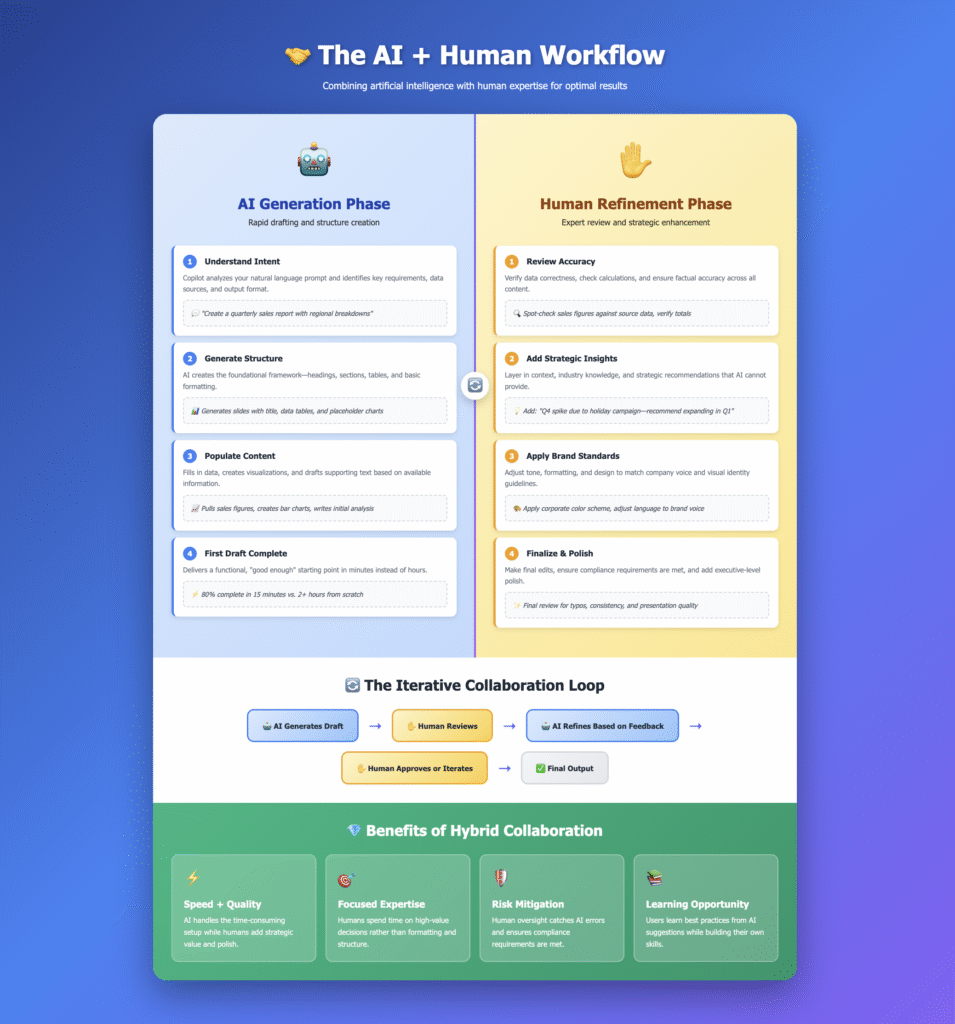
The future belongs to human-AI collaboration, not AI automation. Microsoft’s Agent Mode takes meaningful steps in that direction. However, the journey needs more honesty about current limits and more patience with ability development than current marketing suggests.
This analysis connects to broader themes in AI marketing strategy and digital transformation approaches where sustainable value creation beats revolutionary positioning.
This complete Microsoft Agent Mode review draws from official documentation, independent testing studies, enterprise user feedback, and competitive intelligence. For more perspectives on digital product strategy, AI implementation, and UX analysis, explore additional insights at suchetanabauri.com.
Sources:
https://www.timesofai.com/news/microsoft-365-copilot-agent-mode-office-agent/timesofai
https://www.microsoft.com/en-us/microsoft-365/blog/2025/09/29/vibe-working-introducing-agent-mode-and-office-agent-in-microsoft-365-copilot/microsoft
https://www.design.voyage/microsoft-copilot-usability-rating/design
https://www.reddit.com/r/microsoft_365_copilot/comments/1mlouwb/why_is_my_copilot_studio_agent_so_much_worse_than/reddit
https://www.youtube.com/watch?v=5LZ_mTHUHvQyoutube
https://www.pcmag.com/news/microsoft-sets-the-tone-for-vibe-working-with-new-agent-mode-in-word-excelpcmag
https://dexterous-designs.co.uk/the-pros-and-cons-of-microsoft-copilot-a-design-agencys-perspective/dexterous-designs
https://windowsforum.com/threads/agent-mode-and-office-agent-vibe-working-turns-word-and-excel-into-guided-automation.382556/?amp=1windowsforum
https://valto.co.uk/blog/simplify-marketing-with-copilotvalto
https://www.funblocks.net/blog/2025/09/17/The-Problem-with-AI-Presentation-Tools-And-What-We-are-Doing-Differentlyfunblocks
https://www.proserveit.com/blog/ai-in-marketing-made-easy-with-microsoft-copilotproserveit
https://www.uxtigers.com/post/top-ai-tools-for-uxuxtigers
https://www.linkedin.com/pulse/using-ai-presentations-what-works-doesnt-danielle-john-qlp6clinkedin
Post-launch Performance MetricsMetric-Post-launchLift.csv
https://www.datastudios.org/post/microsoft-copilot-for-business-full-report-on-use-cases-features-and-impactdatastudios
https://coworker.ai/blog/enterprise-ai-productivity-toolscoworker
https://www.ciol.com/tech-buzz/microsoft-adds-agent-mode-and-office-agent-to-microsoft-365-copilot-10514661ciol
https://www.microsoft.com/insidetrack/blog/the-future-of-work-is-here-transforming-our-employee-experience-with-ai/microsoft
https://saxon.ai/blogs/9-real-world-implementations-of-microsoft-365-copilot-in-enterprises/saxon
https://www.microsoft.com/en-us/microsoft-cloud/blog/2025/09/25/empower-your-workforce-with-agents-in-microsoft-365-copilot/microsoft
https://news24online.com/information/redefining-enterprise-productivity-with-ai-insights-from-ankur-khare/638939/news24online
https://www.empowersuite.com/en/blog/ai-presentation-toolsempowersuite
https://www.windowscentral.com/artificial-intelligence/microsoft-copilot/microsoft-excel-just-got-a-copilot-function-but-the-new-ai-has-some-surprising-limitationswindowscentral
https://www.reworked.co/digital-workplace/when-to-use-copilot-in-excel-and-when-to-skip-it/reworked
https://plusai.com/blog/best-ai-presentation-makersplusai
https://research.aimultiple.com/ai-excel/research.aimultiple
- https://www.microsoft.com/en-us/microsoft-365/blog/2025/09/29/vibe-working-introducing-agent-mode-and-office-agent-in-microsoft-365-copilot/
- https://www.pcmag.com/news/microsoft-sets-the-tone-for-vibe-working-with-new-agent-mode-in-word-excel
- https://www.timesofai.com/news/microsoft-365-copilot-agent-mode-office-agent/
- https://www.ciol.com/tech-buzz/microsoft-adds-agent-mode-and-office-agent-to-microsoft-365-copilot-10514661
- https://www.youtube.com/watch?v=5LZ_mTHUHvQ
- https://www.design.voyage/microsoft-copilot-usability-rating/
- https://www.funblocks.net/blog/2025/09/17/The-Problem-with-AI-Presentation-Tools-And-What-We-are-Doing-Differently
- https://www.empowersuite.com/en/blog/ai-presentation-tools
- https://windowsforum.com/threads/agent-mode-and-office-agent-vibe-working-turns-word-and-excel-into-guided-automation.382556/?amp=1
- https://www.windowscentral.com/artificial-intelligence/microsoft-copilot/microsoft-excel-just-got-a-copilot-function-but-the-new-ai-has-some-surprising-limitations
- https://research.aimultiple.com/ai-excel/
- https://valto.co.uk/blog/simplify-marketing-with-copilot
- https://www.proserveit.com/blog/ai-in-marketing-made-easy-with-microsoft-copilot
- https://www.datastudios.org/post/microsoft-copilot-for-business-full-report-on-use-cases-features-and-impact
- https://saxon.ai/blogs/9-real-world-implementations-of-microsoft-365-copilot-in-enterprises/
- https://www.reddit.com/r/microsoft_365_copilot/comments/1mlouwb/why_is_my_copilot_studio_agent_so_much_worse_than/
- https://www.uxtigers.com/post/top-ai-tools-for-ux
- https://www.linkedin.com/pulse/using-ai-presentations-what-works-doesnt-danielle-john-qlp6c
- https://www.reworked.co/digital-workplace/when-to-use-copilot-in-excel-and-when-to-skip-it/
- https://plusai.com/blog/best-ai-presentation-makers
- https://ppl-ai-file-upload.s3.amazonaws.com/web/direct-files/collection_bfbfcb1e-e787-4210-bccb-b2f5c170628b/6179a609-225b-40d6-8494-32f2886ade6e/Metric-Post-launchLift.csv
- https://coworker.ai/blog/enterprise-ai-productivity-tools
- https://news24online.com/information/redefining-enterprise-productivity-with-ai-insights-from-ankur-khare/638939/
- https://www.microsoft.com/en-us/microsoft-cloud/blog/2025/09/25/empower-your-workforce-with-agents-in-microsoft-365-copilot/
- https://www.cloudeagle.ai/blogs/ai-tools-for-productivity
- https://dexterous-designs.co.uk/the-pros-and-cons-of-microsoft-copilot-a-design-agencys-perspective/
- https://www.microsoft.com/insidetrack/blog/the-future-of-work-is-here-transforming-our-employee-experience-with-ai/